Our Community is in read-only mode until April 8th, learn more here. You can still search existing threads or get help via Dropbox Support, the Dropbox Help Center, or Learn.
Notifications
15 Topics
Multiple notifications on desktop app asking me if I want to delete files
Last week my main PC W10, named "Qanto", went crazy making it impossible to use. I was building a new PC. Again W10. In an urgent move, I started to configure it as the New Main PC. Name "TwenyFour" or T24 for friends :-D. While I was here, being forced to access many useful settings stored in "PC/settings BKP" under Dropbox, I also looked around on the PC folder where many Install.Dirs are also hosted. I used this BKP technique on an SD stick for many years, but having Dropbox maintaining that storage updated is much better. _____________________________ Perusing all Dropbox Folders to manage software, and much more ... I've found a lot of old parts saved there not usable anymore. That's a good opportunity to make some order and do some cleaning. Every time I reboot the T24, the notification "do you want to delete XYZ?" appears and asks for an Ok, I give "OK", then another appears, etc, etc, etc may be twenty times :-( ... I've read another 6-year-old thread where reasons were explained, but I found it quite intrusive to insert that ... and stupid not being present in the "notification options setting". No solution appeared so far in that thread, and a search on the forum did not give me interesting results. ANY HELP to block those things? (It never appeared on my old device, it's still not appearing on the W11 laptop ) 6 years .. Thread reference: https://www.dropboxforum.com/discussions/101001014/dropbox-asks-if-i-want-to-remove-a-document-right-after-i-save-it/388342Solved718Views0likes17Comments
I received a Dropbox notification saying my folder is going to expire. What does that mean?
I don't understand much about Dropbox, and it is virtually impossible to get answers, but....Does Dropbox sometimes remove files from your folder without your request or permission? Just now, I received the following message: 1 day until expiration for Annette Hanshaw's RECORDINGS (1926-1934). Does that mean that Dropbox is going to remove a folder that I have put there? Why? What can I do? (4/27/25;8:41 AM PST)490Views0likes9Comments
Mass Deletion Alert (Mac OS Ventura 13.2.1) MacBook Pro
There really isn't a good "category" to post this under so i'm using this one. Over the last several months. I received an email that there was a mass deletion. While at home, I saw this email last night about 9pm - yes it was a sleepless night since my laptop was at work in the office. This has happened about 3 or 4 other times. I am 100% positive i did not delete the folders nor did the 3 other users. 100% POSITIVE. Coincidently, it appeared to happen at the exact same time i closed down my laptop for the night. 6:14PM 2/28/24. My procedure is to Quit all apps, unmount the dropbox SSD Hardrive (i keep dropbox on an external SSD HD), then i closed my laptop for the night. Been doing it this way for years with normally no issues. I believe 3 of the times this happened it said it was me that deleted the folders. One instance it said it was one of our users. I believe the other times this happened it appeared to happened around the time i closed laptop for the night. Thankfully - this morning i went to the deleted items folder (on dropbox) and was able to restore both folders. This worked for the other instances as well, when folders were mysteriously moved to deleted items folder on dropbox - i was able to restore. Not sure what the heck is going on but it has to stop Please if anybody has any suggestions let me know. This can't go on like this. Dropbox what's going on?? thank you dan t Background: all our folders on dropbox are flagged as "offline" and shared to myself (admin) and 3 other users. All users use IMACs. We have the business plan, not sure what the plan is called but we pay about $288 per year/per user. My account is set up on TWO computers my laptop and on a IMAC OS Catalina 10.15.7Solved1.5KViews0likes4Comments
Pop up message asks if I want to move my file to "Deleted"
Hello, I have been using Dropbox to store my family trees for a number of years and within the last few weeks I have been receiving a constant 'pop up' which asks whether I want to move my file to '$Deleted' and explains that if I did it wouldn't be available in Dropbox or any other devices. I have ticked the box 'don't ask me again' but it doesn't stop the message appearing. Every time I make a slight change to the information the 'pop up' reappears and I'm concerned about losing all my work which I have taken 20 years to develop. Are you able to help? Thank you1.1KViews0likes6Comments
Chinese characters in my deletion confirmation pop-up on Windows
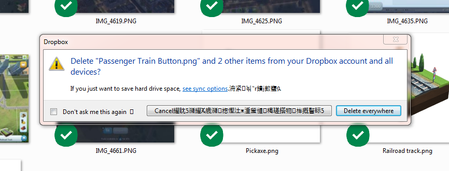
Hi, Something new happen recently when I was deleting some files. When I delete something from my Dropbox, I get a notice that they're moving the files to the Recycle Bin and then another prompt that asks me if I want to remove those files from all the devices connected to the dropbox. The new thing that happen is the last prompt now contains what appears to be Chinese characters. (Picture attached) I've reinstalled the Dropbox on both devices connected and that hasn't fixed the issue. Does anybody know what this is or how do I fix this? I haven't seen it when using any other program. The characters doesn't appear on the "moving files to the recycle bin" prompt but only on the prompt that comes after which is asking if I want to remove the files from the other connected devices. Also the Chinese characters aren't always in the same location. Sometimes they're beside the Dropbox at the top of the prompt and sometimes they on the "Delete Everywhere" button.Solved8.6KViews1like35Comments"tmp.drivedownload" Error - unable to resolve with tech support escalation
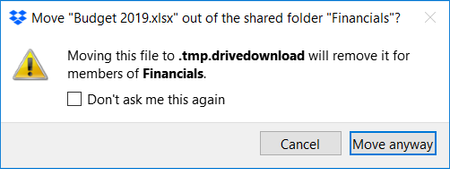
This error has been happening for weeks, and tech support has unfortunately been totally unable to help me. Thought I'd pitch this here. I am on several shared folders with other groups. Whenever someone else on one of these shared folders attempts to save or change a file, I get a popup message that looks like this: Again, I'm not actually taking any action at all - this happens totally without any interaction on my part. It happens for any file, not just the one seen in the example. Clicking the checkbox stops it from happening again for that particular file, but only for one instance. Anytime a new file is touched, the popup appears again for that next file. The scary part is that what appears to happen is that the files seem to get dumped into trash or recycling on OTHER PEOPLE'S COMPUTERS - horrifying! I asked others to check, this and that's the only way we found out that files were getting nuked. I'm very worried that we will later discover that crucial files have gone missing, and only when it causes a crisis. Tech support has told me over and over again to simply uncheck the box, despite my explanation that would stop it for that file, but this happens again for the next file - I want it to stop happening for new files. This has been extremely frustrating. It makes it clear that they are simply not reading my responses. I have Googled enough to discover that this has to do with some sort of conflict with Google Drive syncing, but can't get any info about how to stop files from being deleted, let alone stop the error from happening. Ideas? Thoughts? Things I can test? Please, any help will be gratefully accepted! In the meantime, I've stopped all file syncing in both GDrive and Dropbox, for fear of this accidentally leading to deletion of valuable project or client files. Signed, FrustratedSolved21KViews0likes19Comments
Notification "Show in Finder" is gone
Hello – could you please get back the "Show in Finder" option for notifications? I am not interested having another layer of software "Dropbox app" and I want to edit files directly on my laptop to sync them with others. I already pay for the service and I don't understand why some features disappear.Solved3.6KViews1like10Comments
How Do I Stop the "Online-Only Files" Deletion Warning?
Nearly every time I delete a folder (which is often), I get a popup asking for confirmation. "This folder will be deleted from your DropBox account. Because it has online-only files, it won't be moved to your Recycle Bin, but recently deleted files can be restored on dropbox.com." I never want to see this dialog again. How can I make that happen?2.4KViews4likes5CommentsHow to permanently disable confirmation prompt for file deletion on all devices
Hello, we have dropbox api integrated to our application and recently we have started facing issues where our application cannot pull/delete data from dropbox folder unless we accept the confirmation promte d us. This has become annoying since we get the confirmation box each time we sync and delete data from a perticular folder. No luck even if we select option "Don't ask me again", the prompt appears again in sometime. Please guide me through this so that we can permanently get rid of prompted option/confirmation box since this is giving lots of issues in our application Please look into this as this is the priority since our clients are facing issue using the application.5.2KViews0likes12CommentsI'd like to receive real-time email notifications
Dear Forum Users, I am currently using a free Dropbox account for the purpose of testing. The objective of the overall exercise is to identify web-based solutions for the storage of and collaboration on documents of various standard file types (MS Office files, pdf files etc). I understand that in the notifications menu in Settings I can check the box for "Activity in shared folders (weekly digest)". This presumably means that once a week I get an email message describing what "happened" in shared folders (i.e., additions, revisions, deletions; additional users with access to the folder etc). My company is currently using Egnyte for sharing and jointly working on documents with clients. Egnyte offers the option of receiving updates of the type referred to above on a daily or even on a real-time basis. The real-time notifications have become an essential element of our workflows, so we would only consider switching to Dropbox if a paid Dropbox plan offered the same feature. I have noted that upon installing the desktop app it may be possible to receive notifications of the kind I am referring to although they would presumably not be sent / received via email. Unfortunately, relying on the use of the desktop app is not an option for us. The notifications about changes need to be sent by email and they need to work even if only the web-based version of Dropbox is used. If anyone knows whether any (and, if yes, which) paid Dropbox plan provides the exact functionality that I am looking for I would be grateful for a reply. From some brief research in the "help" section of the website, I note that the notification settings for Dropbox Paper are different / separate from the ones for the regular Dropbox. Ideally the answer would also describe which notifications (if any) are available for Dropbox Paper. From my research, I also note that the use of an additional third-party programme such as Growl or Zapier might make it possible to receive the kind of notifications that we are interested in. We would be happy to consider this option. The cost of additional app subscriptions is not a concern, but whatever we end up setting up has to absolutely, reliably work. Whatever the responses may be, many thanks in advance for your time and trouble. EdSolved13KViews6likes15Comments