Your workflow is unique 👨💻 - tell us how you use Dropbox here.
Passwords
111 TopicsTell Us How You Use Dropbox
No two people use Dropbox in exactly the same way. Some of you rely on it every day for work, others for school, creative projects, or keeping life organized - and we love that. We’d love to hear how you’re using Dropbox today - is it something you use once in a while, is it part of your day to day, are there any features you can’t live without? What workflows have you built that save time or reduce friction? And where do you see opportunities for us to do better? Your tips, ideas, and honest feedback really help us to make sure we can share useful tips, and they help other community members discover new ways to get more out of Dropbox too. Share your experience, favorite features, or suggestions in the comments below. Your voice truly helps shape the future of the Dropbox community 😁 The Dropbox Community Team2.4KViews3likes11Comments
Issue retrieving passwords on Chrome
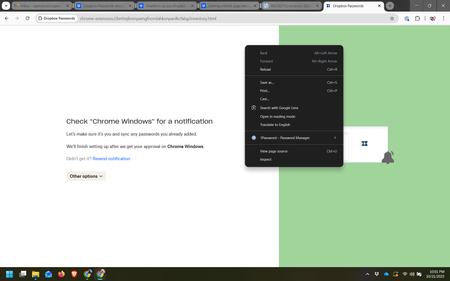
Integration Affected Dropbox Password Device (Dell XPS 16 Operating System/Browser (if using the we Windows 11 / Google Chrome Dropbox App Version (if using the app) Question or Issue Having a difficult time accessing Dropbox Passwords in order to retrieve .csv file to migrate to 1Password. I am getting the window shown below and no further.96Views0likes2Comments
When exactly is Dropbox Passwords getting discontinued?
All the literature in Dropbox indicates we have until October 25 (today) to save our passwords, but I was already shut out as of this morning. The language was vague, sometimes indicating "on" or "by" 10/25, but also this "After October 28, 2025, all Dropbox Passwords data will be permanently and securely deleted." Does anyone have any insight?130Views0likes4Comments
Dropbox Passwords is going away - what about Dashlane?
Dropbox Plan Family Payment Method Card How did you upgrade? Directly through the Dropbox website Question or Issue Hello - I received several emails letting me know that my Dropbox passwords would be going away. My passwords are stored in Dashlane. Do I change them in Dashlane? Thank you - Sarah96Views0likes1Comment
Unable to access Dropbox Passwords
Dropbox Plan Basic. Are you a Team Member or Admin? No. Do you have access to the email linked to the account? Yes. Are there any devices connected to your Dropbox account? Yes, my computer is. Question or Issue Hello, I am trying to access my Dropbox Passwords data until it is shut down. It asks me to check for a notification that does not appear even when I click on Resend notification. This is unexpected because notifications for Edge are turned on in Windows settings. This happens on both Edge and Chrome. I don't know my recovery words. I just want to see my saved data. Clearing cache did not solve the problem.343Views0likes3Comments
Reminder: Dropbox Passwords shutting down on October 28
Hi everyone, A quick reminder that Dropbox Passwords is going away on October 28, 2025. After that date, you’ll no longer be able to access passwords, usernames, or other information stored in Dropbox Passwords. Shortly after, all data stored in Dropbox Passwords will be securely deleted from our servers. ❗ If you haven’t yet, please export your saved information and move it to another password manager before October 28. ❗ You can find detailed instructions and resources in our Help Center. Thank you for being a valued Dropbox Passwords user.100Views0likes0Comments
Unable to delete entries from Dropbox Passwords
Dropbox passwords is going away. I am trying to delete all my usernames and passwords stored on Dropbox Passwords. When I follow the instructions by selecting the entry I wish to remove, click the dots to show more and click "Remove", it will not remove it. It just displays a pop up message saying "Dropbox Passwords is going away". Why won't Dropbox Passwords allow me to delete these entires? They are essentially holding my data hostage. Support is nonexistent and the official instructions for how to delete entires DOES NOT WORK. Device Mac M seriesSolved233Views0likes4CommentsInstructions don't match what I see when trying to download CSV file with my passwords
Integration Affected Dropbox Passwords Device Dell Desktop PC Operating System/Browser (if using the web) Windows 11 Dropbox App Version (if using the app) N/A Question or Issue Objective: Export Password data to CSV file. I'm using the Dropbox extension on Brave (Chrome-based web browser). I've tried to follow the directions, but the instructions do not jive with what I am seeing on the screen. I am using this article: https://help.dropbox.com/installs/dropbox-passwords-discontinuation#How-do-I-export-my-Dropbox-Passwords-data The instructions include content that does not exist when I open Dropbox extension. My responses follow within [ ]. Open the Dropbox Passwords browser extension. [OK, I got a web page.] Click your avatar (profile picture or initials) in the bottom-left corner. [This does not exist.] Click Preferences. [This does not exist.] Click the Account tab. [This does not exist.] Click Export. [Never made it here.] Click Export to confirm. [Never made it here.] I have searched for at least a half hour on the Dropbox Community, but to no avail. Also, I have a screenshot that I can send you. Please advise. Thank you.304Views1like10Comments
So, what's with Dropbox Passwords. I haven't used them, should I care if they are removed?
I received an email from Dropbox letting me know about the end of Dropbox Passwords. I do not keep any of my passwords in Dropbox (I use a database for that). So, do any of my activities use Dropbox Passwords for non-password-related activities (e.g., direct links to files for others to access)? Should I be concerned about this? Thanks for any insight.Solved228Views0likes3Comments