Your workflow is unique 👨💻 - tell us how you use Dropbox here.
Share
2443 Topics
Nothing gets copied to the clipboard after clicking "Copy link" on Linux.
Application Affected Dropbox Device Dell Inspiron 5482 Operating System/Browser (if using the web) Fedora Workstation 43 running Gnome on Wayland. Dropbox App Version (if using the app) (241.4.4853 - found in app settings or About section) Question or IssueThe question is about the context menu in Files. When I click on the Dropbox item in the context menu and choose "Copy link" nothing ends up in the clipboard. The only workaround I found is to go the dropbox web interface and copy the link from there.39Views0likes5Comments
My sharing has been suspended due to phishing content, even though my files don't have any.
Dear Dropbox Support Team, I’ve received a notification stating: “We have suspended your activity. Your files may contain phishing elements.” I tried to solve with online support unsuccessufully. It’s severely impacting my Dropbox experience. I primarily use your service to synchronize files between family computers and to share files with family and friends. I can assure you that my files don’t contain phishing elements, and I make a conscious effort to keep my Dropbox space safe and clean. Please provide further details so I can resolve this issue promptly. Thank you for your support. Best regards.61Views0likes3Comments
Allow us to see all the folders a user has access to and easily remove them from member.
Currently you can see who are the shared people in a folder or file. We need to be able to select a person and see the folders and files they have access to, and then obviously un-share from there. Not being able to manage this easily is a significant security risk.294Views5likes4Comments
Is there a way to share a folder with multiple emails at once?
If I want to share a folder with particular email addresses, is there a way to upload the addresses all at once or do i have to grant access one by one? I realize I can send a link by email myself, but don't want to do that.Solved942Views0likes1CommentA shared folder member is getting a "You are out of memory" error
My shared account, one of musicans that I share a folder with is using windows, and he keeps having issues. The error message he was receiving is “You are out of memory”, I have asked him to delete. his old free DropBox account, which he said he did. I know it’s not my account, because I have 2 TB, and not even close to using a 10th of it. He told me the message he gets from DB is he needs to establish an account using a email address?? I have invited him, with edit and view rights, and even sent a link. He thinks because he briefly paid for an account 30 years ago, the his windows laptop is hard coded. How can he strip any reference to his old DropBox off his windows laptop, and what if he tried a new password. Another weird thing is, when I look at his name it has a red disabled next to his name28Views0likes2Comments
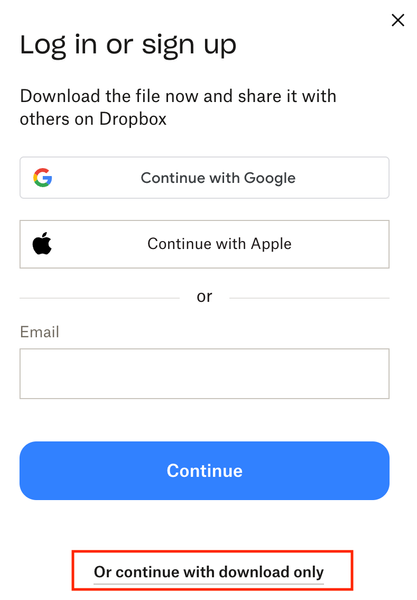
Remove login popup when sharing a link to download
Remove this very frustrating sign in popup. We're all getting sick of our customers and clients asking "can you give me access" or "we dont have a dropbox login" or "can you share it with XYZ" USERS: please like this post so dropbox considers listening. We're paying customers, stop using us as marketing to get more people to sign up. This is the reason we're looking at Sharepoint as an agency. 1 - turn it off 2 - or add a setting to turn it off for PAYING customers 3 - stop locking the topics about it: https://www.dropboxforum.com/discussions/101001014/remove-loginsignup-dialog-box-from-shared-link-download/757059 https://www.dropboxforum.com/discussions/101001012/remove-log-in-or-sign-up-popup-when-downloading-from-a-shared-link/775697 https://www.dropboxforum.com/discussions/101001012/disable-banners-and-popups-for-shared-folders/843215 https://www.dropboxforum.com/discussions/101001014/remove-loginsignup-popup-window-from-dropbox-transfer-link/767931 Remove Login/SignUp dialog from download flow when sharing link to files | The Dropbox Community https://www.dropboxforum.com/discussions/101001014/my-clients-need-to-download-files-via-link-but-the-download-button-isnt-really-v/845332 https://www.reddit.com/r/dropbox/comments/1ft6pyo/remove_log_in_or_sign_up_popop_when_downloading/ Bookmark this post as this image above is very handy to send to your customers as support.36Views0likes1Comment
Questions about the "view-only" shared links
I read <https://learn.dropbox.com/self-guided-learning/dropbox-fundamentals-course/fundamentals-how-do-i-share-with-others#sharing-links,-your-way> I’ve set up a series of nested folders and a View-Only link. Q1: Is there any way that I can prevent one of my link-sent-to-visitors-view-only link from doing a Copy to Dropbox? To be clear, I want them to view it. I want them to download and enjoy what’s there. I know they will share some things. I just don’t want mass copy-everything-that’s-here, which is possible from the main folder I'm sharing. [I think they answer is that I can't stop it.] Q2: If a person I send my link to has their own Dropbox account and does a Copy to (their) Dropbox, can I know they did this? And please assure me that as it's copy not share, II will not be stuck having their folders/files and that I won’t see their stuff unless they specifically share their folders with me. Dropbox Plus Sharing via View-only link Not using a Dropbox folder on my Mac74Views0likes4Comments
Using Dropbox as a method to deliver photos to clients
Question or Issue I have a photography company. Over the years the method of delivering photos to clients has evolved from CD to USB drives and now to Dropbox folders. The problem I (actually my clients) have is some of my clients have complained that they had to purchase a Dropbox account in order to access the shared folder I created for them. Am I doing something wrong, or are they?33Views0likes1Comment