Our Community is in read-only mode until April 8th, learn more here. You can still search existing threads or get help via Dropbox Support, the Dropbox Help Center, or Learn.
Shared Folders
72 Topics
I'd like to receive real-time email notifications
Dear Forum Users, I am currently using a free Dropbox account for the purpose of testing. The objective of the overall exercise is to identify web-based solutions for the storage of and collaboration on documents of various standard file types (MS Office files, pdf files etc). I understand that in the notifications menu in Settings I can check the box for "Activity in shared folders (weekly digest)". This presumably means that once a week I get an email message describing what "happened" in shared folders (i.e., additions, revisions, deletions; additional users with access to the folder etc). My company is currently using Egnyte for sharing and jointly working on documents with clients. Egnyte offers the option of receiving updates of the type referred to above on a daily or even on a real-time basis. The real-time notifications have become an essential element of our workflows, so we would only consider switching to Dropbox if a paid Dropbox plan offered the same feature. I have noted that upon installing the desktop app it may be possible to receive notifications of the kind I am referring to although they would presumably not be sent / received via email. Unfortunately, relying on the use of the desktop app is not an option for us. The notifications about changes need to be sent by email and they need to work even if only the web-based version of Dropbox is used. If anyone knows whether any (and, if yes, which) paid Dropbox plan provides the exact functionality that I am looking for I would be grateful for a reply. From some brief research in the "help" section of the website, I note that the notification settings for Dropbox Paper are different / separate from the ones for the regular Dropbox. Ideally the answer would also describe which notifications (if any) are available for Dropbox Paper. From my research, I also note that the use of an additional third-party programme such as Growl or Zapier might make it possible to receive the kind of notifications that we are interested in. We would be happy to consider this option. The cost of additional app subscriptions is not a concern, but whatever we end up setting up has to absolutely, reliably work. Whatever the responses may be, many thanks in advance for your time and trouble. EdSolved13KViews6likes15Comments
How do I share a folder so the members can add but not delete files/folders?
I need a folder that can be shared with my team. I need one original folder that keeps the updates with the members but I don't want them to be able to delete original documents..?! Is this possible? I have tried with sharing the folder .. either we both have the same authority over the documents, or they can not add anything.. The other choice was copying the folder into the teamfolder - though now it is not updating the original folder with the info from members...!! HELP pleaseSolved7.7KViews4likes2Comments
Cannot move shared folder if I am not the owner
I am trying to reorganize my dropbox because I literally have thousands of folders, and I need them to be more logically nested. This is no problem with shared folders that I own, but I can't move any shared folders where I am not the owner. This is a nightmare, because it means that every folder anyone has ever shared with me remains in my top level dropbox folder and cannot be filed into the relevant subfolder within dropbox. Because I can't find any information about this issue online, I am assuming that my dropbox is not functioning correctly. Hoping someone can help me to fix this issue? Here is the error message I get when I try to move a shared folder where I am not the owner from my top level dropbox folder to a different subfolder within dropbox (that is not shared with anyone else, in case that is relevant): Couldn't move folder To move this folder, try contacting the owner of FOLDER_NAME If I click on the "more information" link, it just takes me to a generic message about team folders. (Note: These are not dropbox business team folders--they are simply shared folders. I have a regular Dropbox pro account, on Windows 11, desktop version.)3.7KViews3likes22CommentsI need to permanently delete my files, but I get message "x items couldn’t be permanently deleted".
When I wanted to permanently delete a file or folder (which I may have shared with others or not). I used to be able to delete it in Finder and then would get asked by Dropbox: Delete "untitled folder" from everyone's account and all devices? I then confirm with "Delete for everyone" and proceed to empty the trash on my Mac. Now I log on to my Dropbox account, go to "Deleted files" and select the ones I want to permanently delete. Then confirm this and they were gone, space would be freed up. Well, gone are those glory days of simplicity, because: NOW I get told by Dropbox: "File XYZ will be gone forever for everyone, including for anyone still using the folder. Permanently deleting this folder won’t free up space." I confirm by selecting "Permanently delete" NOW I get the message: "x items couldn’t be permanently deleted" Dropbox tells me – uselessly: "What you can do": "Ask the owner to help permanently delete this" I AM the #!*¥ owner, aren't I? Plus, didn't clicking "Delete for everyone" on the desktop version make it clear that ALL those files have to go? Shurely this is a recent bug. It wasn't such a hassle before to get rid of old files. Or am I missing something? GrrrrrSolved18KViews3likes10Comments
We should be able to completely remove an external collaborator from an account.
Should be able to completely remove an external collaborator from an account. I deleted the original files I had shared with external collaborators before renewing my Dropbox account and upgrading it to a Business account. I am not able to delete external collaborators. I have no wish to see their names or share information with now or in the future. DEVELOPERS PLEASE CONTACT ME WHEN THIS CORRECTION IS MADE!1.9KViews1like13Comments
Shared folder member cannot delete files to free up their space
Hello Community, This may not be the right category, but there was nothing that matched my issue. I have a friend that is getting messages from Dropbox that she needs to upgrade her payment plan as I shared some files with her. She has no need for those files any longer, but they still come up in her Dropbox link in her computer. We shared those files more than 10 years back! I deleted the files in her Dropbox account, but they still keep showing up in her computer. I was the "owner" of this account and shared it with her and her husband. I assumed I needed to sign into my old account and delete the files and sharing options and then delete the account. I am unable to do so as that account is associated with a very old email address that no longer exists. The Internet provider company folded years ago! I no longer have access to that email account! I do know the email address, and the password for that account, but I get a prompt that Dropbox sent a code to that email address and I have to enter that code in order to sign in. So I am unable to sign in and delete that account. I also cannot get support from Dropbox as their only solution is to use the email address and password, which should let me sign into the account, but it does not due to the code, and then change anything in my Dropbox account. I hope this makes sense and I wonder if any one of you is having similar issues. Thank you!Solved1.5KViews1like4Comments
Organizing Shared Folders
As a busy freelancer, I have different clients sharing folders with me all the time. This has gotten out of control for me. In DropBox, when a folder is shared with me, its dropped in my DropBox root. My question is... can I move shared folders in MY DropBox structure without messing up where the client has it saved on their end? I really need to get this under control and I don't want to screw anything up for my client. Thanks in advance for your help. ~SSSolved2.4KViews1like3Comments
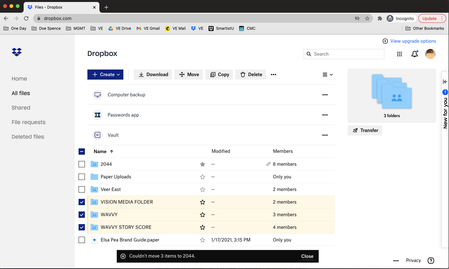
"Couldn't Move 1 Item"
Hello, I have recently upgraded my Dropbox in an attempt to keep my folders organised. I am trying to move "Wavvy", "Vision Media Folder" and "Wavvy Story Score" into the folder "2044", but for whatever reason I keep receving the message "Couldn't Move 1 Item". The same is happening regardless of whether I use an incognito. I have attached a screen shot. Thank you in advance for your assistance. Warm regards, ElsaSolved4.8KViews1like4Commentssharing files and folders with non team members
Greetings to all, Using a business standard account, I would like to create different spaces to share files and folders with specific team members as well as non-members. Typically: Top-level ----> sharedspace1 (john, peter, mary, teammember1) ----> sharedspace2 (jane, peter, teammember1, teammember2) ----> sharedspace3 (peter, chris) When sharing a file (within a shared folder) with non-team members, each non-team member receives an (email) invitation and link to access said file Before the non-member can access the file, he is asked to merge it with his personal dropbox account 1/ Is there a way for non-team members to access shared files / folders without having to merge with their personal Dropbox? 2/ If they do merge with the personal Dropbox: a/ Are any subsequent edits to yhe file from others automatically synced? b/ How can we be sure that third parties do not have access to other files / folders of the personal Dropbox? When a non-team member creates and shares a file / folder (within the shared space), an email can be sent for accessing the file/folder but the file/folder is not created in a shared space; rather, it is created under the private space (purple) of the Team. It can not be seen by non-administrator in the hierarchy. Since a non-member is the owner of the file/folder, it cant be moved into a shared space - not even by the administrator. The error is 'The owner of this shared folder isn't a member of the Team.' 1/ Is there a way to force files / folders created by non-members to live in a specific directory (in a shared space)? Thanks!Solved8.6KViews1like6Comments