Your workflow is unique 👨💻 - tell us how you use Dropbox here.
desktop
11 Topics
Cut the Clutter: Ignore Files Feature is now live
Update: This feature is now live and available to all individual plan customers! Thank you to all our testers, and share your feedback with the team, we're still eager to hear from you! For years you’ve asked for a simple way to exclude files and folders from sync without using selective sync feature. We’re testing a new way to give you more control over what Dropbox syncs and what it doesn’t. If you’ve ever wanted to keep certain files or folders on your device without syncing them to dropbox.com, this feature is for you. 🤔 What is it? Ignore Files lets you list exclusion rules in a special text file called rules.dropboxignore placed in your Dropbox root folder. Any file or folder that matches a rule will stay on your computer but will not sync to dropbox.com or count against your storage 👀 Who we’re looking for Desktop Dropbox users on Windows, macOS, or Linux People who regularly deal with temporary or bulky content, e.g. Software Engineers Video / audio / 3D creators Anyone who hates seeing clutter in their cloud storage Someone who is comfortable trying a closed beta feature and sharing honest feedback 🗓️ How the closed beta works Here’s what to expect if you join the beta for Ignore Files: Register - Fill out the form here → [Sign-up link] Confirm: Eligible participants will receive an email to confirm their participation, along with the timeline details. Get Set Up - Make sure you have Dropbox app installed on your computer We’ll Enable It - We’ll activate Ignore Files feature for you. Try It Out - Use Dropbox as usual for 1 week, ignoring files and folders as needed. Share Your Thoughts - At the end of the week, we’ll send a quick survey. You can also opt into a 30-minute feedback chat (optional, limited spots available!) ✍️ Want in? Fill out the quick screener here by date → [Sign-up link] Keep an eye on your inbox - we’ll be in touch if you’re selected Thanks so much for helping us improve Dropbox. We’re excited to hear what you think! Got questions? Just drop them in the thread below. 💬4.3KViews13likes42Comments🌟🤝Community Spirit Badge 🤝🌟
Hey everyone! 🌟 It’s Theresa here. You’ve probably seen me hanging out in the Community, jumping into conversations and joining discussions (if you haven’t seen me before, well, hello 👋). And while doing that, I’ve noticed something pretty great (well, we all have here on the Dropbox Community Team) – so many of you are out here making this Community an amazing place. Whether you're helping others, sharing useful tips, or just bringing good vibes ✨, your contributions really stand out. To recognise and celebrate this, we’ve created a brand-new badge… This badge is all about celebrating the people who make this space feel like home. It’s for those who do more than just answer questions – the ones who offer a helping hand 🤝, share great tips 💡, and keep the good vibes flowing. Whether you're solving tricky problems 🧩, sharing useful resources 📚, or just making the Community a fun place to hang out 😃, we see you and we appreciate you. The Community Spirit Badge is a one-time award 🏆, so if you earn it, you know you're doing something special. It's a little extra recognition for those who truly bring the Community to life. We’re so excited 🎊 to launch this new badge and can’t wait to start recognizing the amazing individuals who truly bring the spirit of this Community to life. And if you spot someone who you think deserves the Community Spirit Badge, don’t hesitate to tag me Theresa within the thread. T 💙 (Dropbox Community Manager)843Views5likes0CommentsExciting times on the Dropbox Community - Live conference
We’ve got something really exciting happening on the Community next week 🤗 We’ve been looking forward to this for weeks and we’re delighted to share it with you now. On Tuesday 10th October 2023, you’ll be able to join us right here for a live screening of the keynote presentation from Work in Progress: Perspectives. You can watch all the action live from 9:00am EST 👀 When we’ll be hearing from our CEO and Co-founder Drew Houston, followed by some exciting product updates directly from our Leadership Team. If you’d like a little insight into what lies ahead for Dropbox, including the future of work 👩🏽💻 how AI is helping to transform the tools we use 🤖 and the opportunities this creates, be sure to make a note in your diary now and keep an eye on the Community for more information.1.8KViews3likes1CommentWhat’s new: Dropbox Shop, editing PDFs, and Dropbox Backup
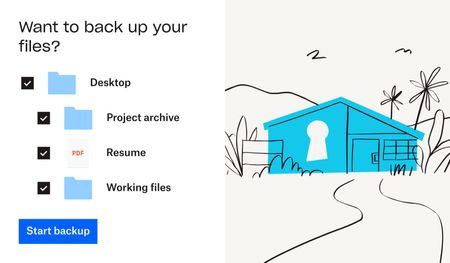
This is a big month for product updates, so keep reading to get all the details about Dropbox Shop, Dropbox Backup and PDF editing. Trust us when we say there are some seriously useful updates here, whether it’s to do with day-to-day file management, security or an online shopfront - exciting times! Secure your digital life with Dropbox Backup—here’s what’s new: Backing up your files, as you know, is super important and if you need a simple and secure backup solution to protect the most important parts of your digital life - Dropbox Backup is for you. Whether you have family photos, graduation videos, or tax forms on your computer—you can keep it all safe and quickly recover with Dropbox Backup. If you’re a member of the Dropbox Community, chances are you’ve heard of Computer Backup before, so what’s the new news? Based on feedback from customers and our Community members, the team have made improvements to Computer Backup - building on our popular backup functionality, we’re now introducing Dropbox Backup. Backup has been upgraded with new features our users have been asking for, including a new restoration flow, settings to manage your backups on your computer, and more. Simplify your backup experience- Manage everything from your desktop—one place to check progress, view history, and prioritize specific files. Be prepared with an automated safety net- Keep backed up files separate from your shared files, so you won’t have to worry about overwriting your emergency backups. Rely on fast recovery if things go wrong- Start recovery with just a few clicks, and your files will be automatically restored from cloud backup. Dropbox Shop is here, and ready for you to try: You might have heard us mention Dropbox Shop before, but now you can join the Public Beta and check it out for yourself! (If you are outside of the U.S. or are part of a team and want to sign up, click here). Dropbox Shop is a new platform that allows creators (like you, maybe) to easily sell content—from e-books and recipes to prints and workout videos—directly to customers, so you can spend more doing what you love: creating. With Dropbox Shop you can: Easily create product listings in three clicks: Add content directly from Dropbox or your computer, set a custom image, audio, or video preview, and determine your price, and now, tipping is also enabled. Customize your storefront: Set your seller profile up with a name, picture, and description that lets customers know exactly who you are and what you’re doing! And if you want to update it later, you can simply edit the items and your storefront too. Make the connection: Establish your brand and maintain your relationship with customers through a custom storefront, not a cluttered marketplace of sellers. Add content directly from Dropbox: No need to upload your files all over again. Sell any type of content: With the ability to upload multiple files, of any type, up to 50GB per file for Plus/Pro users and 2GB for Basic users See what works (and what doesn’t): View key analytics to help learn what’s working and what can be better for your business. Share directly with customers: There’s no middleman here. You control how you interact with customers - you can share a listing directly with them wherever you interact with them already, whether it’s on email, social media and even newsletters. Enable secure payment processing: Don’t worry about managing payments, it’s covered through our partnership with Stripe and Paypal and multiple payment options for customers. Automatically deliver content upon payment: That allows you to save time facilitating sales, and keep on creating. Simplify transactions for you and your customers: Buyers don’t need a Dropbox account to make a purchase, they can access their files via email verification and download it within 28 days. Those with a Dropbox account can access everything they’ve purchased when logged in. Work conveniently from your desktop, tablet, or mobile Why not take the first brave step and put your work out there for sale? As we said, you can set up your first content listing in 3 easy clicks, so get started here. Save time and edit PDFs in Dropbox PDFs are incredibly handy files, but sometimes they need to be updated, and now, you can edit them without leaving Dropbox. Well, just exactly how much editing can you do? Within Dropbox you can: Rearrange PDF pages Insert, rotate, and delete PDF pages Fill interactive forms Manage multiple versions: save PDFs as a copy or replace original These features are available to a select few in Beta now, and will roll out to more people in coming weeks. Sounds like a time saver to us! Will you use this feature? Now you can keep your files safe with just a few clicks, sell your digital content, and edit PDFs in no time, which sounds good to us! But wait, there are even more updates you can check out here. Will you be using these new products and features?16KViews3likes5CommentsIntroducing:: File Locking for Shared Folders
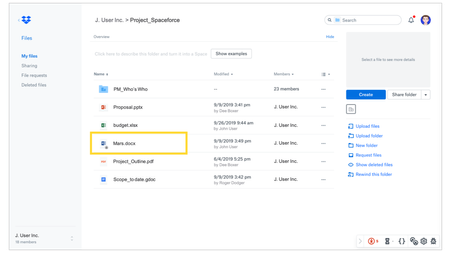
Overview This feature gives file collaborators the ability to lock a file that is contained in a shared folder so it can’t be edited by any other collaborator. Files can be locked via dropbox.com or, alternatively, directly on your Desktop App. Locked files will then be made read-only for all other collaborators. Collaborators will be able to comment on and share a link to locked files, but only the user who has locked the file, or team admin will have the ability to unlock it. A locked file will have a lock icon on the thumbnail in Finder/Explorer & on the Dropbox website. Timeline Business teams can opt in to early access through the Admin console, beginning October 16 2019. ( In order for a team to opt in to file locking, they must be migrated to the new sync engine ) General access will begin intially on December 18 and rollout will continue throughout Q1 2020. Screenshots5KViews2likes0CommentsEven more Dropbox Product updates
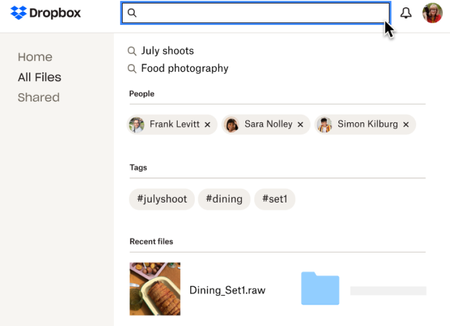
We always love being able to share new Dropbox updates with you, so here are some improvements you might be interested in, including email updates, Backup news and improved search within Dropbox! Email to Dropbox is ready to use for business now too Email to Dropbox allows you and your trusted contacts to forward email attachments directly to your Dropbox account using a unique email address - that means everything sent to that email address is safe and secure in your account, without having to download or upload your files one by one. Quickly save your email attachments—like images and PDFs—directly to your Dropbox account so they are safely stored and easy to find when you need them. Perfect for saving you time, which can help you to keep your work-life balance in check! Reduce the steps needed to save your email attachments in Dropbox—quickly set up your unique and secure email address within seconds and simply forward email attachments directly to your Dropbox account Keep confidential files safe by having trusted clients and partners send sensitive documents directly to Dropbox, where you can securely store them and control access and permissions. Find your content faster by centralizing your email attachments alongside the rest of your content within Dropbox, so you don’t have to search across multiple places to find what you need Learn all about how to set up your unique email address here. Dropbox Backup updates You’ve heard us mention (obsess over) Dropbox Backup, and we’re glad to share an update. Now, with the Dropbox Backup plan, you can back up unlimited files on one external drive, in addition to one computer. Just plug in your external drive to back it up to the cloud with Dropbox Backup—it’s that easy. Videos, photos and personal documents that are stored on your external drive will get backed up to Dropbox Backup, where you can access from any device. Keep your digital life safe with Dropbox Backup, so you can quickly and smoothly recover from anything, spills on a laptop or on a hard drive. Check out the Dropbox Backup plan here. Improved Dropbox search capabilities It’s frustrating when you just can’t find what you’re looking for, and that’s why the team has been working on improving search within Dropbox. These improvements will help you find your content faster, especially when you can’t remember the file name. It happens, we know. Fast navigation with Dropbox recommendations. Dropbox will highlight your main collaborators, tags created by you and your team, and recent files and searches. Filter to find content faster. Instead of scrolling to find files in search, filter by date modified alongside folder, file type, people, and image properties to find what you need. Spell check that allows you to quickly identify misspellings and target your search more directly. We are excited about these updates, especially because it can be hard to remember all our file titles, but tell us what you think below!1.7KViews1like0CommentsIntroducing:: Admin actions on desktop
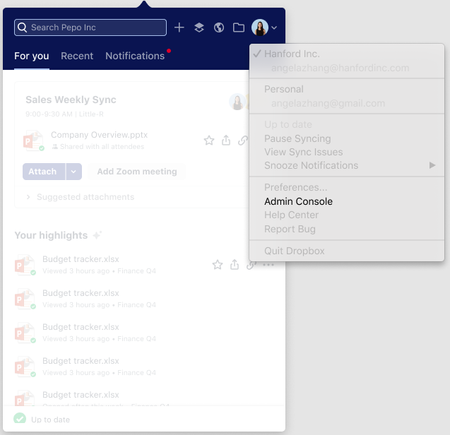
Overview We are introducing new entry points to the Admin console for admins of Dropbox Business teams. Admins will now be able to access the Admin Console from the Dropbox system tray/menu bar, and from the account switcher of the Dropbox desktop app. We are also introducing a tray notification that gets triggered every time a member requests to join the team. Through this notification, admins can approve the request to join a team directly from the desktop surface, meaning they do not have to go to the Admin Console on web to perform this action. Audience All teams5KViews1like0CommentsIntroducing:: Permissions at Upload
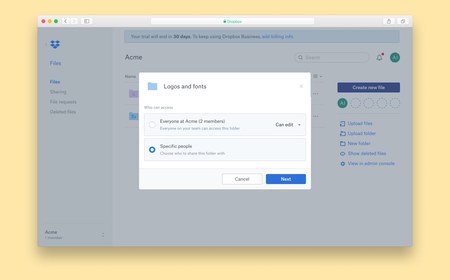
Overview On the Dropbox website, when a you attempted to upload a folder to the root folder of your shared team space, you can now set permissions for that folder, specifying who can view the content you are adding. Audience All teams that have team and member folders How do I use it You can find more details about Team Folders, and how to use them here. More ideas If you have more ideas on how we can improve our product then check out our Paper ideation board here, or our Dropbox Business ideation board here. Request improvements, suggest ideas, we’ll review them all! Thank you for helping to improve our product.2.8KViews1like0CommentsIntroducing:: People Pages
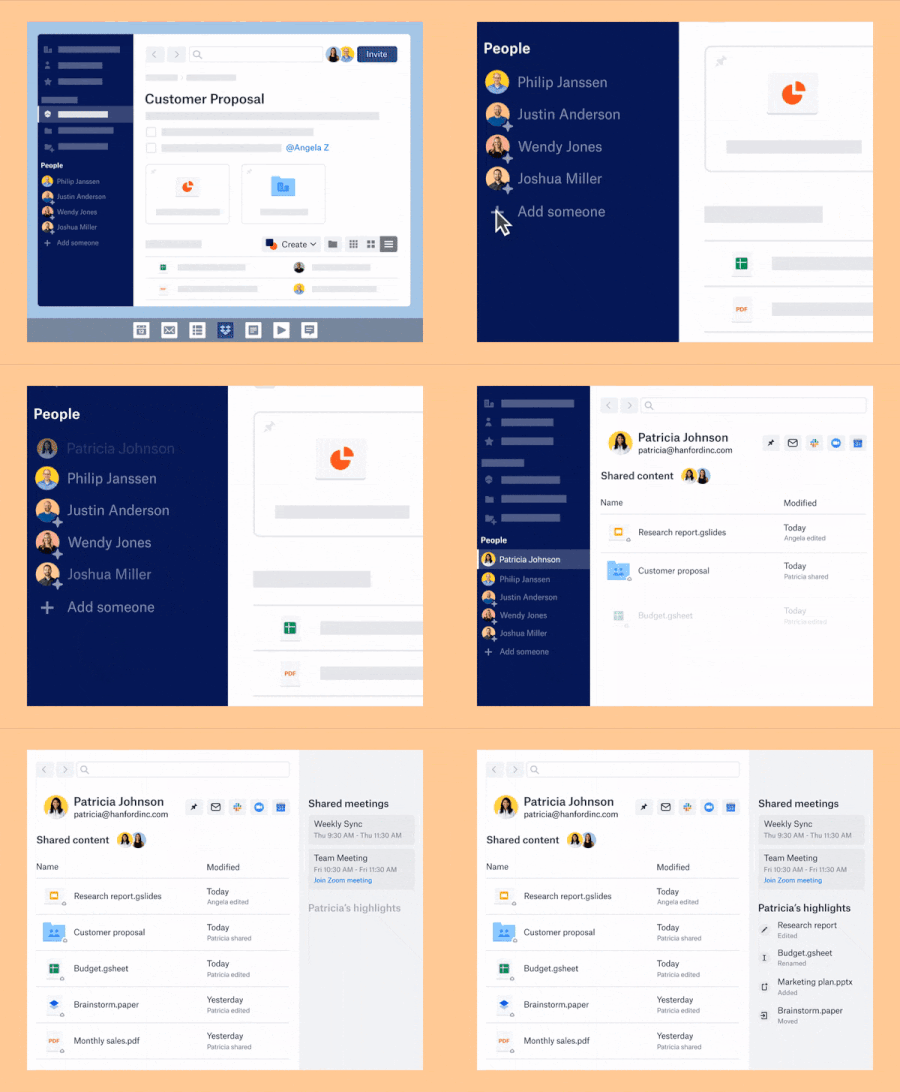
Overview People pages is a feature that enables us to put people at the core of the user experience at Dropbox. When a Dropbox Business user opens the desktop app, they will now see a list of suggested people in sidebar pane- These are the people that we believe Business users collaborate with most frequently. You can also add people you collaborate with yourself manually. Clicking anyone from the people list will take them to a rich profile of the person. Users can now spend less time looking for content and stay focused working with people through the following features: Shared Content: Displays which files/folders you and any teammate are working on together, and what they’ve updated within the past 90 days. Teammate highlights: A section that allows users to get a glimpse of your teammates activity highlights. Collaboration: Business users can check their co-workers schedule or connect with them via Slack, email or Zoom from one convenient place, people pages within desktop app - dependant on their co-worker’s calendar sharing/viewing settings. Shared Meetings: Allows you to see meetings you and your co-worker have in common and join them from the Dropbox desktop app. People suggestions: People pages intelligently suggests teammates based on your collaboration history. You can easily add new teammates or pin your key team members to side bar for easy access. Audience All Dropbox Business users on the desktop app How do I use it You can find more details on how to use it here: https://help.dropbox.com/teams-admins/team-member/people-pages More ideas If you have more ideas on how we can improve our product then check out our Paper ideation board here, or our Dropbox Business ideation board here. Request improvements, suggest ideas, we’ll review them all! Thank you for helping to improve our product.2.7KViews1like0Comments