Your workflow is unique 👨💻 - tell us how you use Dropbox here.
desktop
34 Topics
How can I protect my Dropbox files, when my laptop needs service?
Dropbox Plan Basic Are you a Team Member or Admin? No Do you have access to the email linked to the account? Yes Are there any devices connected to your Dropbox account? Yes Question or Issue For the first time since I bought my first PC in 1985 or so, I'm having to leave my computer with a tech support company, briefly, and I want to make sure that they can't access any of my files. I plan to move my files to an external drive and remove them from my laptop - but what do I do about my Dropbox files? I currently auto-sync files between my laptop and dropbox's "cloud" - how do I make sure that the tech can't see any of the data in any of my Dropbox files?46Views1like2CommentsI can't find the Preferences for the Dropbox desktop application
I had drop box set up on my laptop months ago, the subscription lapsed and I decided not to renew because I just couldn't wrap my head around how it worked and to go with Google One. But that is not available in my country so I am back to Drop Box. I signed up to a plan, but used a different google sign in to the previous one I was using. I tried to set up auto synch but all the instructions tell me to click on the profile picture or initials in the bottom left corner - mine are top right. I can't find preferences anywhere. If I try and install the desktop app it tells me I am signed in with another account. I cannot get Dropbox to pin to the task bar (I just have quick start option) I have now signed out of the original account on the laptop and the phone but still getting the same message that I already have an account. Totally confused and fed up.107Views0likes5Comments
How to use more than one Dropbox account on a single computer?
Quick question — is it possible to run two Dropbox accounts on the same computer without constantly signing out or making separate user accounts? I’m not super technical, just want personal + work available without cluttering my disk — what do people actually do?188Views0likes4Comments
Can only install with "Run as administrator", possibly causing syncing problems
On Windows 7, my account is the administrator account, yet I could only install dropbox by running the install file 'as administrator' (right-click > Run as Administrator). I received a warning when doing this saying that Dropbox may not work properly but I was forced to ignore it because there was no other way for me to install. When I tried installing normally the install process would just disappear instantly with no error message or explanation. Nothing happened! So now I have it installed and my 'live' folder is not sync'ing to the files on my dropbox account. I suspect this is the problem I was warned about when I had to install 'as Administrator'. Is that likely to be the case? And how in the hell can I install Dropbox normally? I've searched the web and am very surprised not to find a solution to this out there. Surely it can't just be me who's come across this issue.Solved9.1KViews0likes11Comments
Setting up Smart Sync is not working
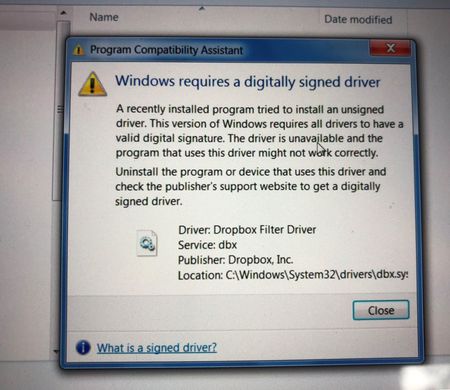
Hello all, I'm trying to setup smart sync on a windows 7 64 bit desktop. The problem I'm getting is right after it's done installing I get this box that flashes on the screen "Windows requires a digitally signed driver" . Then I click on the dropbox icon and it says Smart Sync is experiencing an issue... , and then dropbox proceeds to start downloading every file. Things I've tried, I disabled the anti virus, I've ran the intall program as as admin, I've set the computer to online only, I went into GPedit and regedit and told the system to ignore the driver signing. I'm at a loss. Please help, thank youSolved8.7KViews0likes5Comments
Dropbox unnecessarily prompting users to allow system extension while whitelisted on Mac OS
macOS 10.13.2, Apple gave MDM administrators the ability to automatically whitelist any desired Kernel Extensions so that the user would not be prompted to allow the extension manually. We do this to our machines in the field and, when enabling Smart Sync, Dropbox does not seem to notice that it's extension is already whitelisted. The user is still prompted to Manually Allow the Dropbox System Extension which they can't do because the extension has already been allowed (the option to manually allow doesn't show up in System Preferences). This puts them in a situation where they can only enable Smart Sync by canceling the Allow System Extension Prompt from Dropbox and clicking that they don't want to use Smart Sync, and then going into the Dropbox app settings and enabling Smart Sync in there. Please fix this so that Dropbox can notice that it's system extension is already approved and not prompt to user to allow it.Solved6.7KViews0likes9Comments
Can I upgrade to Dropbox Plus to delete local files from a stolen laptop?
my laptop was recently stolen. I have a Basic account right now. is it possible for me to upgrade to Plus and remotely delete the files on the stolen device? really appreciate the help and guidance, thanks.Solved1.5KViews0likes5Comments
Business and personal account - cannot unlink personal and link to new personal
I currently have two accounts, business and personal. My husband has his own account. With the upgrade to 2TB, we no longer need to have 2 accounts. I unlinked my personal account on my work laptop. It still has my business account. I cannot figure out how to link to my husband's account (our new shared account). Dropbox defaults to my old personal account login and will not let me edit it. If I try to use the "Google" signin, it chastizes me that I need to use my old personal login. I have gone to the Dropbox website and unlinked the devices (my work laptop) as well. Doesn't matter. Do I need to unlink my business account as well to give me a chance to link to my husband's personal account (aka, our new shared account)? Thanks for any guidance on this.Solved8.5KViews1like8CommentsSerious security issue with the recent upgrade
SERIOUS SECURITY ISSUE I have been managing Dropbox for a number of companies for 10 years or more. The recent upgrade that was pushed out to a company I manage last Thursday 01 Sept 2022 has exposed a serious security bug in the Dropbox upgrade After the upgrade whilst adding a Business DropBox account to a new profile on a new laptop, a folder with several subfolders unrelated to the account I was installing appeared during the sync process. The initial sync took several hours to complete but during that time the private folders from a different account in the same enterprise were visible and accessible, 117 GB of data not shared at all with the account was available without restriction. Selective sync did not list the folders as they were not shared with the account at all so could not be removed by unticking them in selective sync. When the sync process was complete the folders disappeared from the root folder but upon further examination there is now a folder in the local accounts private folder with the same folder name appended with (shared folder conflict) and it contains 53.9GB of data from the other unrelated account with access "Only You" indicating they are not copies synced back to the original folders. This account now contains data it should never have had access too and the other account holder would have no idea this had happenedSolved2.8KViews0likes7CommentsCannot unlink old device
I'm getting Dropbox full because of an older PC, listed as PC(1) in my usage. I go to my Settings Security and see only my current PC and laptop listed. I need to unlink this old device from my account but I cannot find a way to do that. I have a Microsoft Office 365 subscription.1.2KViews0likes5Comments