Your workflow is unique 👨💻 - tell us how you use Dropbox here.
dropbox business
178 Topics
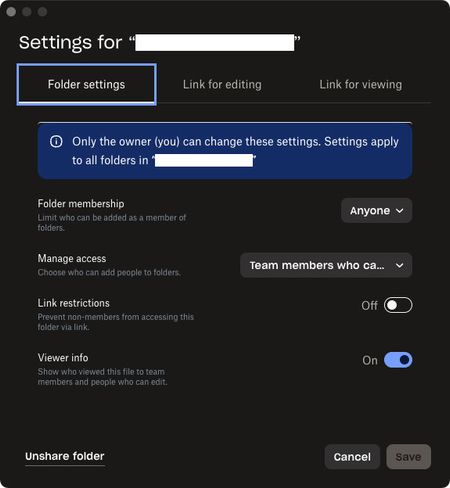
External users cannot upload to a shared folder they have edit access to
Been trying to get this to work for many years but always give up and use a different service. On my company’s team dropbox I want to create a folder with the purpose of collaborating with outside vendors. I can create invites, confirm access with edit permissions for the outside person, and they can join no problem, but they only ever have download permissions and can’t upload anything to our folder. Am I missing some permission setting? The other method of using a File Request for them to upload something does work but isn’t ideal. These are the settings used for the most recent attempt:188Views0likes5Comments
I can't add a team member to a folder, and having issues contacting Support in order to get help.
Hello Community Ive been with DROP BOX for over 15 years. Ive reached my limit and cannot stomach the owners of DB anymore. Fleecing small business is not admirable. Creating confusing menus to generate more revenue aimed at small business owners who cannot manage these complicated systems. I initially signed up for DB as a storage tool but realized you cannot rely on DB for storage as files are constantly lose however ive been able to use the the platform as collaborations tool. However the platform has become a cess pool of dishonest practices. I pay thousands of dollars per year you would think i could have access to support? You want me to explain to you all these error messages. The platform is purposely deceptive in order to upsell. These practices are making people like Drew Houston more money and are contributing to working class peoples misery. I have a small business im paying enterprise rates yet i dont have access to support (which i bought the add on). I cant add a team member to a folder says im not the owner but i am the owner i cannot contact support despite paying $3k per year. This platform is awful. Someone tell me a good alternative please for the love of GOD119Views0likes4Comments
Error when trying to create a top level folder from my local Dropbox folder
This is still going on? I cannot create a top level folder through Windows file explorer, even though I am the owner of the account? People have been bitching about this for at least a year. Logging in to the website just to create a folder is cumbersome and aggravating. It used to work through explorer, why did that change? You should change it back, it doesn't seem like it would be difficult and would result in fewer complaints and possible departures to other cloud options.
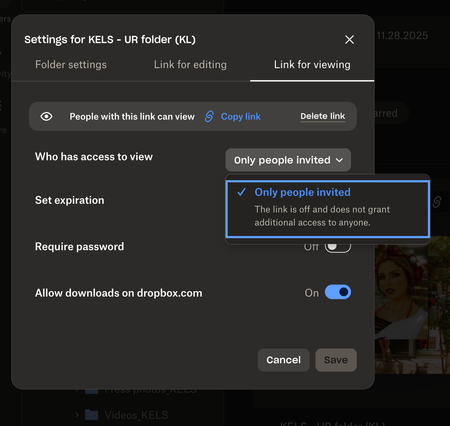
I no longer see the "anyone with link to view" option for shared links on my Dropbox team.
Help! I feel like I am going crazy trying to figure this out. I have a business account and recently have had trouble creating links so that anyone with the link can view. This is a new issue and one I haven't had before. It used to be so easy to create folders and links to share easily with colleagues but not no matter where I look, I am not seeing that option anyomore. It only gives me the option to invite individual people to view/edit the folders I am creating. Is there something I missing or a restriction I mistakenly added to my account? I'd rather "anyone with the link to view" be my default than it be protected as 90% of the time I want to create links that are easily shareable and viewable. See attached screenshot. Is anyone else having this issue as of late? Thanks in advance for any help you guys can provide!104Views0likes3Comments
I can't share files with non-members; they're being asked to sign up to Dropbox.
I need to share various files (spreadsheets) with non-members. It is just one file per customer and I only have 30 or so customers. I have tried using both the "share" option and the "copy Dropbox link". Neither works and my customers tell me that they are also being asked to sign up to dropbox rather than just letting them access the file. All I get is the really annoying response "That didn't work for some reason". I would send a snip showing that response - but as one might expect from dropbox, there doesn't appear to be an easy way to attach a file to this request. Please don't just tell me to switch to Microsoft OneDrive - I am aware from others that its functionality is much better but I would prefer not to have to migrate to there. Although it is quite unbelievable, considering how much we pay for Dropbox, that it is not capable of doing this easily.127Views0likes6Comments
The desktop app is syncing forever
I am in this situation now. I have Dropbox business with 3 Tb and I have lots of files... It was fine until last week or so when I tried syncing and it syncs infinite. It starts at about 7K files and I let it run. I noticed that it will be at say 7232 files then it will jump to 7258 then start decreasing. It does this constantly but file numbers will vary. Eventually it gets to about 400 or so and it says a minute left, then it jumps back up to 800 and the process repeats over and over... Looking at the sync and storage in the app. It shows that I have like 5% of the dropbox on harddrive. This is not the case. I have it all on the drive so there is something rotten here. I've wasted way too much time on this and nothing works. I'll probably stop using this and go with a RAID system internally and swap out drives and periodically store one off site.87Views0likes3Comments
Folder shortcuts to other Dropbox locations inside of share folders
I would like to create a public share folder called something like "Company Information" Then I would like to create individual folders that will be perpetually able to be downloaded by a customer using a QR code or link with their information in it. I would like a way to link the public share folder inside of the individual folder so that they can access it by clicking the link to their folder then navigating to it with some sort of short cut. This allows me to have 1 up to date location for all company information long term without updating it in every folder.Solved70Views0likes1Comment
Online-only folders - can these be made visible on desktop app?
Hello, We have a business licences with you for 4 licenses. We use Macs all up to current OS. I am trying to re configure our office network folders within Dropbox but need guidance to achieve this as we’ve had some problems thus far with shared folders and incorrectly syncing to our computers such that it filled the hard drive and caused a collapse. I am starting the process afresh and would request your guidance on how I achieve the following please? 1. Each work station has current projects or job folders that are within a desk top Drop Box folder app, synced to online for back up. This is all fine with no change required. 2. JOBFILES FOLDER We have an archive of all past jobs which is some 90 thousand files in a folder called JOB FILES. The intension is to have the JOB FILES folder stored on Dropbox online via our Admin work station. This folder is accessed periodically to search and pull out old files as may be required, and to upload new files every month. This folder therefore needs to be visible on each desktop - but not synced to save hard drive space. Should this folder be set up as a Shared folder or simply a standard folder that can be shared afterwards within the team? 3. CURRENT FOLDER This is to be set up similarly to the JOB FILES in that it needs to be visible on each desk top. We will drop work daily work files into this folder on a regular basis during each day. The files within sit there until they are sorted and put to their respective job folders within the JOB FILES folder mentioned above. It is preferred that this folder is not synced to the computer hard drives either to save space. 4. What are the implications of the desk top computer used to set up these files. We have an admin desk top computer that is used as the base point for setting up all admin such as common drop box folders. For convenience, I did set up the above folders on my own laptop, as shared folders. I thought this would be no other than if setting up on the admin computer as all files are shared equally anyway. I now wonder if this would-be better that all folders are set up within the admin desktop computer’s DB licence, if that makes sense as keeps my own laptop clear of admin stuff. Maybe it makes no difference in terms of DB sharing? If you could please get back to me ASAP with any advice, as I’m keen to get this all done this week to allow us to get up and running again.Solved7.6KViews0likes3Comments
Inviting someone to Dropbox Folder
I have access to a folder on Dropbox that I am not the owner of but that I do have admin privileges to. I need to invite someone to that folder, however, they have an individual account and the folder I want to invite them to is a business account. I invited them once and they lost access to their folders. How do I invite them in such a way that they don't lose access to their individual account while being able to access everything in the folder that I want them to access?4.3KViews0likes1CommentBackup and sync selected folders from QNAP NAS
Hey guys, I have a server dilema, we have a small NAS server which my colleagues save projects too. I simply want to be able to backup this particular folder (about 1 terabyte) onto the dropbox and sync as and when projects get added and updated. QNAP app has 'cloud backup sync' which lets you add dropbox account. So we got dropbox business and synced the folder and it exceeded 25,000 API calls and wont reset until end of the month. There seems to be a fair few issues. I can't be the only one who wants to backup some contents of a NAS server to the cloud? is the only solution is installing a drive directly onto my computer and have the app running locally? Thanks RoySolved13KViews0likes6Comments