Our Community is in read-only mode until April 8th, learn more here. You can still search existing threads or get help via Dropbox Support, the Dropbox Help Center, or Learn.
emails
61 Topics
False missleading emails
Just got a email with the Title "⚠️Action requested: ****, your files are about to stop syncing!" Only for it to be a sales email telling me to upgrade my accout The accout has be used to archive some stuff and has not been added to in ages and has over 400MB of the 2GB free. "NOTICE: ****, your files will stop syncing soon." "Your Dropbox storage is reaching maximum capacity. Adding one more file could fill up your account—and keep you from syncing and accessing your files when you need them." Yes and adding 100 small files may not fill up or I may delete stuff to free space and it may never fill up This is nothing but false underhanded scare tactics spam to get people to upgrage. If this is not true please explain why my files will stop syncing Soon If I stay below my limits?7.8KViews9likes11Comments
I need our invoices automatically emailed each month to someone who doesn't have a Dropbox account.
Can you please add the ability to set up an automatic email of our monthly invoice to our book keeper. Also, the book keeper is not a member in our Dropbox, as they don't need to be. They just need the invoice emailed to them - that's it. This is my second time requesting this feature. The first time you just closed my request without providing an answer or solution. This is terrible customer service IMO. This request has also been submitted by other DB members - I've seen the threads asking for this and the response from DB that their requests will be closed - terrible! I DON'T WANT TO DOWNLOAD MY INVOICE!!!! I want my invoices to be automatically emailed to my book keeper each month. I (like many) am extremely swamped with work and I don't have time to login and download invoices for my book keeper every month. This is an extremely inefficient workflow and it requires me to be a middle man. How long does the DB community have to wait for such a feature to be deployed? Please do not reply with instruction on how to download my invoice - I know how to do it because I am FORCED to do it every month.431Views4likes2Comments
Why does Dropbox keep emailing me about billing after I've downgraded?
Don’t know who is supposed to look at this, but I canceled my subscription to Dropbox (I wasn’t using it; I don’t need it.) via the Apple app just like the website tells me to do. Since then, I have been getting harassing emails from the Dropbox billing mail bot telling me they can’t bill my credit card. No sh*t Sherlock … I canceled the subscription … and I did it before the renew process was to have begun. So why are you sending me emails, multiples even, each day when I have followed your process to unsubscribe, downgrade, and cancel billing? Now, I’ll be happy to pay Apple for the extra storage space if and when I need it.Solved9.6KViews3likes21Comments
Possible scam email sent directly from noreply@mail.hellosign.com
Hello! This morning I received a strange email from noreply@mail.hellosign.com and it was for a signature for a subscription for Geek $quad(?). It's $399 USD and I have no idea what this service would be for. I Googled the "customer support team" phone number and it came back as potentially being for an escort service in Florida. I checked my bank accounts, Paypal and Venmo, and don't see any pending charges. The signature request is also from an email and name I do not recognize and it appears they're a student at an Italian university(their email may have been hacked I'm guessing). So yeah, definitely not convinced this is a legit charge, but I can't lose $399 dollars either, so I guess I'm trying to see if this legit, or just spam. The fact that it was sent from a legitimate Dropbox email gives me pause. No, I did not click the links, but when I hover my cursor over the links in Chrome, I can see the URLs are for official Dropbox services. I called Geek Squad, just to confirm that there is no account in my name. I'm not sure if there's a specific way to contact Dropbox directly about this, or if this is the appropriate method. Thanks to anyone for offering help! [Removed as per Community Guidelines]Solved11KViews2likes13CommentsDropbox keeps spamming me about my storage space running out
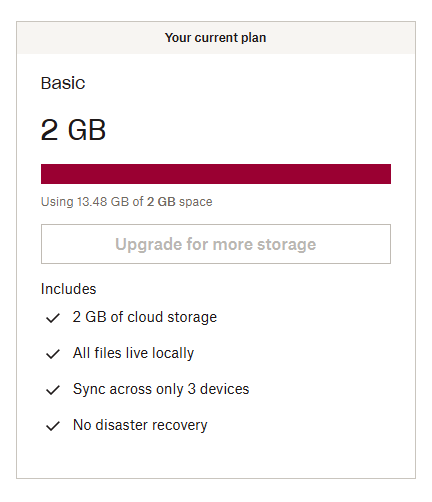
Dropbox keeps sending me emails and notifications about my storage space reaching its capacity, as if I've got 100 megabytes of it left or something. It says that if I won't buy another plan then I'm risking losing my files, and a dozen of variations of the same message. I've been using Dropbox since 2010 and I've got a basic free plan of 2 gigs, but I've increased my storage space by inviting friends and doing "challenges", so now I have around 16 gigs of space and 13.5 of them are used. That is not "critically low on space" by any means, but I keep receiving so many spam notifications that it's starting to look threatening. Either Dropbox has a bug in calculation how much space I have occupied by comparing it to the basic plan instead of actual space, or it's doing it on purpose to force me to pay. Also I cannot contact live support since I have a free plan. I'm thankful to Dropbox for the service it provides but I'm pretty sure this is not how a service should treat its long-term customers. If this is a bug then I sincerely hope that it will be fixed as soon as possible.2KViews2likes4CommentsCommunications look like Spam
Hi. What's going on with your e-mailers or whoever there is spamming my mail every week. Headers: "Alert alert", "Open ASAP", "Review ASAP", "Attention!", "This is urgent". Please stop. You sound like some clickbait tabloid magazine trash. I don't mind if my dropbox is full, it's okay, and I will not upgrade my account. Get some journal and public relations education for your workers.Solved10KViews2likes13CommentsI can't access my Dropbox Plus account; a one-time code is sent to my old address.
Hello, I have the following problem. My Dropbox Plus account is linked to an email address that no longer exists because it was changed. When logging in, the code is sent to this old email address, which I can no longer access. You can bypass this with the code by clicking "Having trouble receiving a code?", but unfortunately, this doesn't work for me. How can I log in without a code so I can change my email? Thanks in advance!1.5KViews1like20Comments