2025 sparked some incredible conversations across our community 👩💻. Discover the highlights and see what’s ahead in 2026.
mobile
325 Topics
I get a "Sign-in failed" error when I try to log in on the mobile app on Android
Hi there, I've been having issues login in on my mobile phone the past few days. Used dropbox on this device for years, but suddenly can't log in anymore. Initially the error was "invalid code" every time I entered a code I had just received via text message. So I opened dropbox on my desktop and switched off 2 factor authentication. Unfortunately that hasn't solved my problem, I still can't log in on my phone. I now get a message saying unknown error. I am on dropbox basic plan, currently have 2 devices linked. I unlinked the device giving the issues hoping I could link it again, but no success. Any advice on how to solve this?41Views0likes2Comments
App on phone has files, but app on laptop has only recent files
Application Affected (Dropbox app phone and laptop.) Device (iphone 16e, ASUS Sonic master and ACER TravelMate.) Operating System/Browser (if using the web) (Windows 11, ) Dropbox App Version (if using the app) (454.2.2 - I have Dropbox Plus on my phone and it was synced to my ASUS laptop but it shows as basic now on that device. I have Plus on my phone and always have. I downloaded Dropbox to my ACER ( work issue laptop) and logged in and it is BASIC and has only files from when it opened. The email on my phone is an old one but on the browser it shows the new one. I need the devices to sync to the one account. Any help would be appreciated.21Views0likes1Comment
I want to sync my Dropbox files to my internal storage on Android
Synchronization does not work on Android. I download files to a folder that is only accessible from Dropbox itself. It is completely useless. I need to synchronize files to a folder in the internal storage, just like on Windows! Otherwise, other apps will never be able to access my files.64Views0likes3Comments
Make offline files visible in the Android file-system
I think you should make files stored offline on Android available in the file system. As it is now, the dropbox files marked as 'available offline' are hidden from the rest of the operating system. This gives a number of problems: 1: When opening a file in an app, that app may put the file path in its 'most recently used documents'-list. However, since the path it gets from the Dropbox-app is not long-lived, the 'most recently used documents'-list becomes unusable, since the links on it become dead rather quickly. 2: It makes using browsing apps, like photo viewers or podcast players, on your offline files impossible. 3: Some apps expect content to be found on the file system. For example, the samsung app used to download content onto a samsung smart watch, expects to find files in the file system. It cannot be used to download files from dropbox onto the smart watch. 4: Sometimes a smart phone is used a bit like a computer. Like uploading files to an FTP-server and the like. A FTP-client typically expects to find files on the file system, and allows them to be selected and uploaded. This does not work with Dropbox. A possible work-around is to export the contents from the dropbox offline folder onto the phones regular file system. This is unsatisfactory because: 1) It feels cumbersome. The number of clicks to send a podcast episode to a smart watch, or to download a .pdf from dropbox and upload to an FTP-server, becomes a few too many. 2) For files which can be edited (like password manager saves, various profiles, text documents etc), the user needs to remember to copy the file back to Dropbox, which is very error prone. Dropbox obviously already has technology to synk a file system folder with dropbox. Could not this functionality be offered on smart phones also?22KViews89likes82Comments
Authentication required on iPad Files app
Hello, when trying to import from the files app on an iPad, it keeps asking for authentication in the Dropbox app, I did logged myself in the app but Files keeps asking and don’t give me access to the dB files. thanx a lot for your help.Solved10KViews0likes24CommentsUpload a photo album from iPhone to Dropbox
How can you upload just one photo album to Dropbox from iPhone? I would like to just get my Favorites album uploaded to Dropbox. Is there a way to either 1. select a whole album for upload or 2. easily select all photos in an album for upload? From what I have tried, it appears I can only select one photo at a time. I have 2,400 favorite photos I want to upload to Dropbox and selecting them one at a time is not a task I am up for. And importing to my Mac first doesn't seem to be an option either... Image Capture doesn't show albums. iPhoto wants to import all photos first (and can't because there's not enough space on my computer). iTunes doesn't show albums because iCloud is on. I could download from iCloud but then the photos lose all the date/time metadata that I need. Would appreciate any help! Thank youSolved32KViews1like5Comments
Syncing Dropbox files to Android SD card - third party apps?
Hi everyone, As you may know, Dropbox doesn't sync files on Android any more as of last year or so (see this, for example). They used to be in sdcard>Android>data>com.dropbox.android>files, but the new "available offline" option stores them in the cache of the Db app, which other apps cannot access (you wouldn't be able to locate them with Files, for example), to ensure their safety, I would guess. The only way to use these files on your device apart from through the Db app is to "export" them after they were made "available offline" (so basically to properly download them locally), and it is thus impossible to do what Dropbox is meant to do in the first place : read and write synced files. I personally would like to edit note files on my computer and my phone and to get them synced by Db, but there seems to be no way to reach and edit locally stored (note) files with my note-taking app. The only workaround I found to this problem is using third party app that syncs files with your Dropbox repository, such as Dropsync or FolderSync, which were explicitly meant for that : "New files in your cloud account are automatically downloaded onto your device. [...] This is how Dropbox works on computers but not on Android. Two-way automatic synchronization should be an essential function of the official app. For whatever reason, it is not the case. Dropsync is here to fill the gap." [Dropsync app description] But then I am not too keen on adding more complexity to my workflow, increase the likeliness of some incompatibility or other "technical issues" to emerge in the future and, moreover, to potentially put my professional and personal data into more covetous digital hands than they already are in (free apps that manipulate my data? I sense what the product might be)... So my questions are : has anyone in here ever tried these solutions and did it work as planned? Any (unusual) worries to have regarding privacy with these solutions? And above all (@support people?), is there any way to circumvent the issue without these? Cheers15KViews8likes8CommentsMobile app on iOS frozen due to an ad pop-up
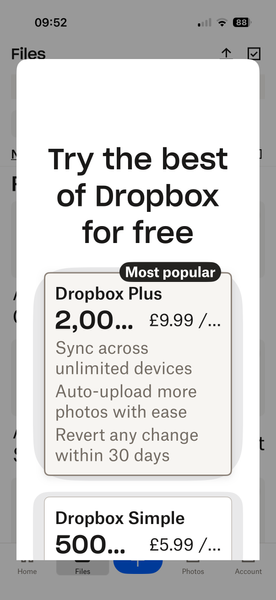
hi, I have recently found that when opening my dropbox app on my iPhone 16 pro, after about 5 secs the screen is filled with the dropbox advert 'Try the best of Dropbox for free' this covers the whole screen and there is no way of shutting it down. See the screenshot below. Any suggestions apart from the normal, log out log back in again, would be gratefully received. Thanks, JillSolved67Views0likes4CommentsI can't open a file, which I have downloaded from Dropbox using the direct download link
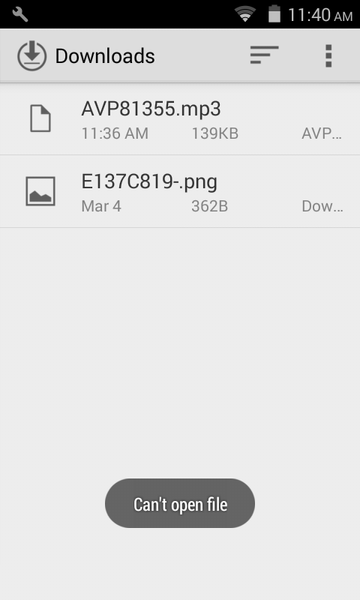
Hi There, In mobiles, I couldn't able to open the downloaded file, which I have downloaded from Dropbox using the direct download link (here is the dummy link for your test - https://www.dropbox.com/s/zsfyc5tulg13630/AVP81355.mp3?dl=1). But the same file can able to access through Dropbox mobile app.Solved26KViews1like15Comments