Your workflow is unique 👨💻 - tell us how you use Dropbox here.
sync
38 Topics
Dropbox not syncing to Apple folders (Desktop, Documents, Downloads)
Device MacBook Air M4 Operating System/Browser (if using the web) Sequoia, Tahoe Dropbox App Version (if using the app) 241.4.4853 Dropbox Plan Family Question or Issue My files are on Dropbox online. I now need to download them to my Mac (I've tried this on both a Tahoe and a Sequoia machine). Although the Mac already has Desktop, Documents and Downloads folders, the Dropbox app creates a new parallel set of (virtual) folders under the same names, residing in the Dropbox folder (~/Library/CloudStorage/Dropbox. In the past Dropbox used to sync with the existing Apple folders, but that's not been the case since a few OS X/Dropbox versions. It is my understanding that the parallel folders are supposed to be there, but Mac would mirror these, to make it look like they are in the `Apple folders. It makes no difference whether either File Provider and/or Backup is on or off. How do get rid of this double folder issue?41Views0likes2Comments
My files aren't syncing. Is my app connected to the right account?
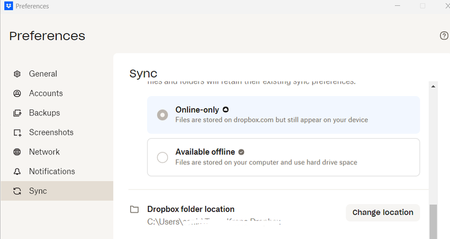
I am a new employee to a company. The previous employee had a dropbox acct on the same computer that I use, however my files are not syncing with the other team members for the company. When I open preferences below is the dropbox folder location which is that of the previous employee. How can I resolve this issue?178Views0likes21CommentsYou are not eligible for Dropbox on File Provider at this time
Device Macbook Air 2020 M1 Operating System/Browser (if using the web) Tahoe 26.3 Dropbox App Version (if using the app) 241.4.4853 Dropbox Plan Standard 2TB Question or Issue I have selective sync on. When I look at the Sync tab in Preference, it says "You are not eligible for Dropbox on File Provider at this time" under Dropbox Folder Updates. All of my synced files are defaulted to be online only and shows Zero bytes in Finder. There is no right click option that I can make them offline available.42Views0likes2Comments
I've looked everywhere online for my selective sync settings, but I can't find them.
I have looked everywhere on my Dropbox.com account and cannot find sync anywhere. I have found preferences and there is nothing about sync there. I have a colleagues whose screen shows sync under this menu. I have been on Dropbox since 2008. I upgraded the desktop app but don't know if or how I can update the desktop application. Any suggestions? Could she possibly have a paid version if she has selective sync -- but even with the free version I should have sync shouldn't I so I can remove files I don't want to sync Her message: Across the menu bar at the top you should see a drop box icon. Click on it. [Note: this only opens my dropbox - I need to click my personal icon and then I get setting and preferences] Then you’ll see an option called settings or preferences. Click on it and you’ll see an option that says sync. [Note: I don't see sync option anywhere here] Click on that and look for an option that says ‘selective sync’ Here you can click only the folders you want.Solved8.6KViews0likes7Comments
Selective sync is misleading and has led to my company not using Dropbox properly 😠
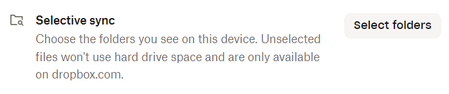
My company's Dropbox is quite large and obviously it would be undesirable to sync its entire contents locally. Yet during Dropbox login, you are told that your hard-drive does not have enough space, leading you to think that you should use selective sync to minimize what folders get synced. Moreover, this same idea is implied on the description for the Selective Sync option itself: The option implies that if you sync files to your hard-drive, they will use hard-drive space. Yet, all of this is false. Dropbox syncs files as online-only. They only download locally when opened or if the folder option is set to "Make available offline". Consequently, numerous people at my company have not been syncing folders. They've been using Dropbox through the browser, which is tedious and has encouraged them to keep work files locally or elsewhere in order to avoid the aforementioned tedium. Who knows how many hours this has wasted across the company over the past couple of years. This might some of the worst UI design I've ever encountered. Dropbox is sabotaging the way in which users want to use their product. I'm a long-time Dropbox user. I stuck with the product out of loyalty. If I had wanted a cloud drive in 2025 and ran into this, I would not used Dropbox. TLDR: Please stop telling users that their hard-drive space will get consumed when they log in. Please change the Selective Sync description to not imply that hard-drive space will get consumed on synced folders.118Views0likes1CommentChanging the location of my Dropbox folder on Windows 11
Question or Issue I am trying to change where the dropbox app looks for my files. I had to reset my Win 11 OS and reinstall the DropBox app, so it now points to c:\dropbox, instead of e:\dropbox where my files are actually located. Changing the folder in the desktop app fails because it says there is already stuff in e:\dropbox. There used to be a place in the web page settings that worked to change this, but I cannot find it now.155Views0likes1CommentCan I stop seeing notifications every time a backup file becomes online-only?
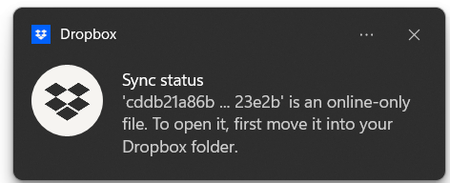
Device Windows 11 & Ubuntu Dropbox App Version (if using the app) 231.4.5770 (Windows and Ubuntu) Question or Issue I am using Dropbox on Windows and Ubuntu. On Ubuntu I am using the DejuaDup backup utility which is syncing to Dropbox. The issue is I am getting endless notifications like the one pictured: I'd like to opt not to have these notifactions, my notifiction settings are as follows: I don't need the Ubuntu backup on my Windows machine but certainly don't need the notifications all the time about it, does anyone have any ideas how to stop it, or where I can put a feature request in for a new notification toggle?119Views0likes3Comments
Cannot set default sync state for new files to "available offline"
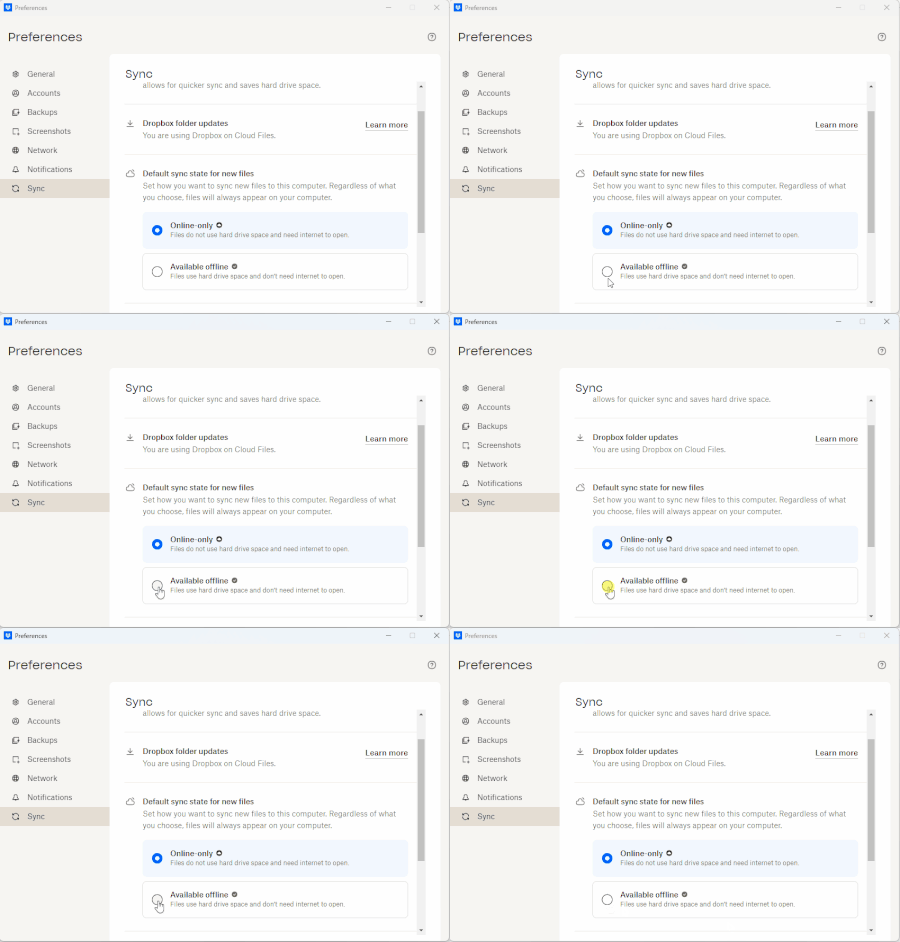
I am unable to select "Available offline" as the "Default sync state for new files" within the desktop application Preferences. I do have the ability through the "right click" menu to "Make available offline" or "Make available online-only" This was working in previous versions. I only noticed recently because someone shared a folder with me and it was not immediately available offline. Device Desktop Operating System/Browser (if using the web) Windows 11 Pro 24H2 Dropbox App Version (if using the app) 228.4.5567 Dropbox Plan Family410Views0likes9Comments
No option for "make online only" when I right click my files
I have a professional DropBox account and I'm working on a Mac, OS 12.5. I have several files that are sync'd locally that I would like to move off my hard drive and make online only. When I right-click on the folders, however, I'm not getting the option from the drop-down menu to make the files online only. Any suggestions? Thank you!Solved12KViews2likes56Comments