We're making some changes to the Dropbox Community 👩💻 - Find out more here.
windows
23 Topics
Dropbox for windows crashes after launch
Hello! I tried reinstalling dropbox, tried advanced reinstalling. This does not help. I try load Dropbox 178.4.4811 Offline Installer.x64.exe - not help Hello! I tried reinstalling dropbox, tried advanced reinstalling. This does not help. I try load Dropbox 178.4.4811 Offline Installer.x64.exe - not help After start DB i see new damp file in C:\Users\123\AppData\Local\Dropbox\Crashpad\reports\Solved6.1KViews0likes39Comments
Windows 11 - Screenshots saving to dropbox but no longer to my screenshot folder after lappy crashed
Newbie here. My dearest tech gal friend Karen (BFF too genetic) who used to help me through these dilemmas passed during Covid but I do try to carry on as she taught me. Learning and searching and stretching my boundaries. Little over a week ago my 3 year old HP Envy hit be with that dreaded blue screen of death. I fought (muddled) my way into DOS (scary territory for this old gal I tell you!) but totally reinstalled windows 11, and as I don't store anything much on the hard drive the possibility of loss was slight. I had fabulous success (Thank you my lost friend) and got up and running reloaded all apps etc. But I am stuck with one single glitch, try as I might I can't figure out what I'm doing wrong I save my screenshots to my DB and into a folder simply named screenshots . . have done this since friend Karen introduced me to the program some 10 years ago . . . Now all my screenshots are still going into the DB but they won't go into the folder / file but are loose at the bottom of the screen I know it's probably something ridiculously simple but to this basic appliance operator I'm rather tired of fighting this on my own so humbly come looking for help Thank you ahead of time HP Envy Windows 11Solved4.3KViews0likes8CommentsMissing sync option (smart sync)
Where do i actually find the **bleep** smart sync, I either have to download and then sync or went to the website to access the file. With all the youtube guide I watched none of the preferences option are the same to each other. I am using a Windows 10 Laptop if that mean anything.Solved4.3KViews0likes36Comments
How can I disable the push notification when copying Dropbox link from PC
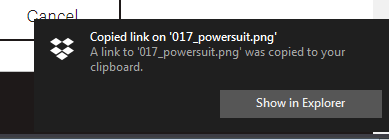
I don't want dropbox to tell me I just copied I file. I know I did, because I just told it to. How do I disable that? I've already gone to Windows' Action Center and disabled Dropbox' icon and notifications there, I disabled every notification in preferences->notifications for the PC program. Yet I keep seeing them. How do I get rid of this for good?Solved2.5KViews1like5CommentsI cannot get both my personal and Business accounts to show up in Windows file explorer
Have just purchased two new machines and am being driven nutts by Dropbox. I have a business and a personal account. On my prior machines both appeared in File Explorer. With them linked or unlinked, I can only get one to appear. HAve Dropbox seriously removed this feature? If not, how can I get both to appear?1.2KViews0likes8CommentsUnable to move Dropbox folder from users to C drive as I'm getting an error
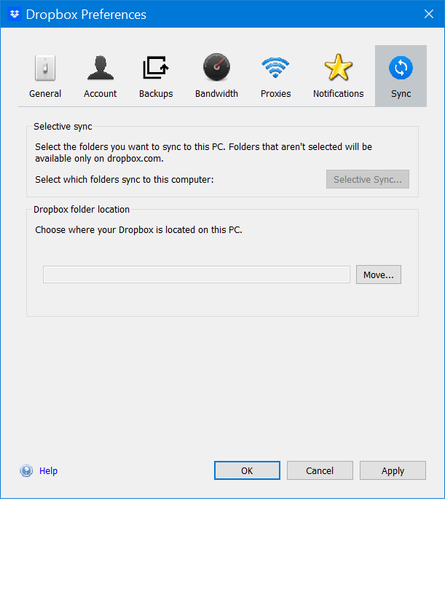
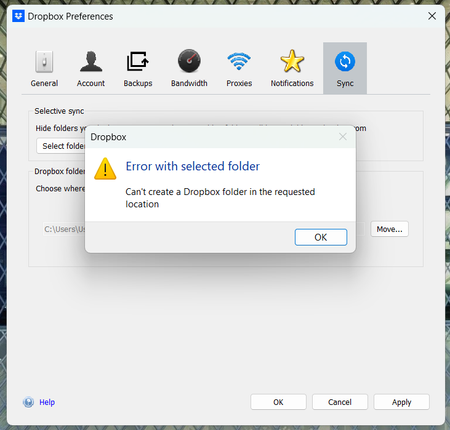
I am unable to create my dropbox folder in (C:), it only lets me in users/user, but this does not work for me because im trying to work on a shared project and the file route breaks because of the location of my folder, ive tried just about everything from unistalling to manully moving, please help me Thank you1KViews0likes5Comments217.4.4417 breaks screenshot pasting feature on Windows
A new update of Dropbox was pushed to me today. It added a new set of options related to screenshots. Show quick action after screenshot... I dislike this, I preferred just getting the notification, but at least I can turn this off. When Screenshot is ready... "Copy link to clipboard" or "Copy Picture to clipboard" I typically take a screenshot by pressing print screen, then pasting the screenshot in Discord or my art software, I REQUIRE this functionality to maintain my productivity. but I also like to have the image saved to dropbox as a backup. With "Copy Link to Clipboard", well, it's a link, Art software isn't going to know what to do with that, and discord doesn't inline images from Dropbox very well, so I'd still rather have an image in the clipboard. The 2nd option, "Copy Picture to Clipboard", well, when I try and paste, nothing happens. I want a 3rd option... "Leave Clipboard alone", just, whatever print screen normally does, just let it happen. Just Save the image to my Screenshots folder in Dropbox, and leave it at that, like it used to be. Is that too much to ask? Note: I do pay for Dropbox.Solved800Views0likes15CommentsRemove Dropbox from Windows' context menu
I come again with to ask for an option to remove Dropbox entries from Window's context menu. The reason is I am visually impaired and I must use tools to have greater fonts showed in my screen. I must use also the magnifying glass and other availability resources. Then the 7 (seven!) context menu options that Dropbox has added to my Windows File Explorer context menú (in teh upper part of it) makes my context menu so difficult to access the bottom options of the list that I have serious problems to do my job. Believe me this should absolutely be an option the user should be able to deal with, and not an option forced by Dropbox. The topic was already raised in a previous post (Add option to remove Dropbox options from context menu) by Martsssssss and upvoted by six more people (see below) but has been closed by reasons I cannot understand (Inactivity?) It would be great to have it reopened and taken very seriously. Handicapped people like me will greatly thank it.600Views1like5Comments
I keep receiving annoying sound notifications from my Win11 Dropbox app.
A few days ago, on my Win 11 PC, I started getting Dropbox notifications multiple times a minute. There were small information boxes that appeared for a while. I think that I changed a setting to stop the boxes, but still the annoying tone keeps sounding! I clicked on the icon in the system tray and clicked "pause syncing", but that did not stop the sound. I then clicked on my initials, then Preferences, then Notifications, and then turned off all notifications. The notification sounds (I assume they are notifications of some kind) persisted. The notifications on my Dropbox account (via Chrome) all seem to be email notifications, and probably not relevant. The only way that I can stop the notifications is if I choose the "Quit" option from the app (in the system tray). The syncing seems to be continuous. Mostly just 2 or 3 files, but then all of a sudden it shows over 500 files syncing, then it quickly drops to 2 or 3. I don't know if this is related, but for better security, I recently created an Admin account and downgraded my everyday account to a non-admin account. I think that the Dropbox issues happened before that change, but I am not 100% certain. Any help or ideas would be appreciated!Solved600Views0likes9Comments