Our Community is in read-only mode until April 8th, learn more here. You can still search existing threads or get help via Dropbox Support, the Dropbox Help Center, or Learn.
Forum Discussion

NikLG
4 years agoExplorer | Level 4
Can't open files in 3ds MAX that are on Dropbox
**Just thought I'd edit this top post** I think this has been resolved quietly by either Dropbox or Autodesk, as I no longer have any problems with syncing or anything. Hello all, Similar to t...

Megan Dropbox Community Moderator
4 years agoDropbox Community ModeratorHi NikLG, I hope you're having a great day so far!
Can you let me know if all of your files are synced locally or online-only?
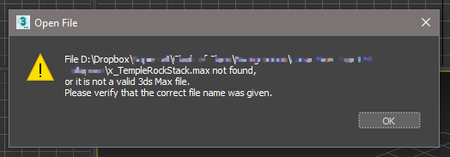
Keep in mind that the error in the screenshot isn't coming from Dropbox directly.
Keep me posted.
Can you let me know if all of your files are synced locally or online-only?
Keep in mind that the error in the screenshot isn't coming from Dropbox directly.
Keep me posted.
 NikLG4 years agoExplorer | Level 4
They are synced locally when I open them.
If it helps, it seems to be only 3ds MAX that has the issue.
Yesterday, I opened a file in Photoshop that MAX wouldn't open, and resaved it to Dropbox with the same
name, and in the same location, and MAX would then see it and open it.
So it may well be a MAX issue rather than Dropbox...
 TOMSAL3 years agoNew member | Level 2
I have exactly the same thing. It works on files on the machine where they originated , it no longer opens on my other machine tho.
- TOMSAL3 years agoNew member | Level 2
As an aside there is there is a thread on this on the autodesk forums. it's definetly a dropbox thing. because if you copy paste the file (even in fropbox) it fixes the issue.
https://forums.autodesk.com/t5/3ds-max-forum/dropbox-will-preview-a-3ds-max-file-but-won-t-open-it/td-p/10330352- Здравко3 years agoLegendary | Level 20
Hi TOMSAL,
The best thing you can do is turn your "Smart Sync" (especially in quotes) off and make your files local (not "online only" with cloud emblem). If you don't want to turn off entire (Non)"Smart sync" for some reason, do this (set to local) on all files you are working on currently, at least.
Hope this helps.

About View, Download, and Export

Get support with viewing, downloading, and exporting files and folders from your Dropbox account.
The Dropbox Community team is active from Monday to Friday. We try to respond to you as soon as we can, usually within 2 hours.
If you need more help you can view your support options (expected response time for an email or ticket is 24 hours), or contact us on X, Facebook or Instagram.
For more info on available support options for your Dropbox plan, see this article.
If you found the answer to your question in this Community thread, please 'like' the post to say thanks and to let us know it was useful!


