Our Community is in read-only mode until April 8th, learn more here. You can still search existing threads or get help via Dropbox Support, the Dropbox Help Center, or Learn.
Forum Discussion

NikLG
4 years agoExplorer | Level 4
Can't open files in 3ds MAX that are on Dropbox
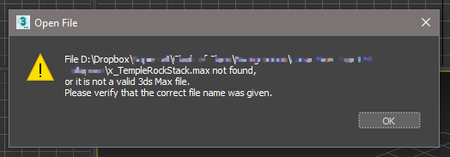
**Just thought I'd edit this top post** I think this has been resolved quietly by either Dropbox or Autodesk, as I no longer have any problems with syncing or anything. Hello all, Similar to t...

TOMSAL
3 years agoNew member | Level 2
As an aside there is there is a thread on this on the autodesk forums. it's definetly a dropbox thing. because if you copy paste the file (even in fropbox) it fixes the issue.
https://forums.autodesk.com/t5/3ds-max-forum/dropbox-will-preview-a-3ds-max-file-but-won-t-open-it/td-p/10330352

Здравко
3 years agoLegendary | Level 20
Hi TOMSAL,
The best thing you can do is turn your "Smart Sync" (especially in quotes) off and make your files local (not "online only" with cloud emblem). If you don't want to turn off entire (Non)"Smart sync" for some reason, do this (set to local) on all files you are working on currently, at least.
Hope this helps.
- TOMSAL3 years agoNew member | Level 2
I've never used smartsync and all my files are already local. Just doublechecked..
It's kinda weird, copying the file does solve the problem for now. But that's impractical in the long run.- Здравко3 years agoLegendary | Level 20
TOMSAL wrote:... all my files are already local. Just doublechecked..
How do you "doublechecked" it? What is the emblem on some troublesome file? is it a tick on green background or white cloud?
TOMSAL wrote:..., copying the file does solve the problem for now. ...
Of course, it will always do in such a way. 😉 Locally manipulated files are... local (for some time, at least). Make the things sure; don't left with guessing. I believe on the files, that you made some copying on, emblem got changed from cloud to tick. Isn't it?
- TOMSAL3 years agoNew member | Level 2
About View, Download, and Export

Get support with viewing, downloading, and exporting files and folders from your Dropbox account.
The Dropbox Community team is active from Monday to Friday. We try to respond to you as soon as we can, usually within 2 hours.
If you need more help you can view your support options (expected response time for an email or ticket is 24 hours), or contact us on X, Facebook or Instagram.
For more info on available support options for your Dropbox plan, see this article.
If you found the answer to your question in this Community thread, please 'like' the post to say thanks and to let us know it was useful!


