We’re Still Here to Help (Even Over the Holidays!) - find out more here.
Forum Discussion

NikLG
5 years agoExplorer | Level 4
Can't open files in 3ds MAX that are on Dropbox
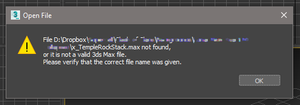
**Just thought I'd edit this top post** I think this has been resolved quietly by either Dropbox or Autodesk, as I no longer have any problems with syncing or anything. Hello all, Similar to t...

samrikken
4 years agoExplorer | Level 3
Hi Walter
We have check the settings of drobox and they are set for local storage for all files, see below.
When checking the files itself it also states that the files are indeed saved locally.
But indeed as soon as we close the Dropbox application files are shown as not saved locally and do not load when trying to open them.
That does seem in line with the error we get "file .... could not be found" while it is visible in the explorer.
Hope you have an idea of what is going on here and how we can try to fix this.
Thanks in advance,
Sam

Walter Dropbox Community Moderator
4 years agoDropbox Community ModeratorI can see that the rest of the folder is online-only, Sam - have you tried making the whole folder locally available to your computer?
Also, can you clarify if you get an error when trying to open those files with our desktop app completely closed?
 lukaszwolenski4 years agoExplorer | Level 4
3Ds Max can not see and re-link to its scene local files, that were before - even for a minute - online-only via dropbox. Other software works fine with it (for example After Effects). Its a massive problem. I have around 1.5TB libraries of proxies and textures and old 3D files made on other PC in 3Ds Max. And this files are usless on other PC with downloading all 1.5TB libraries LOCAL by drobox. Its an catastrify, I payed for dropbox just for this purpose and it doesnt work...
Somehow in re-downloaded files (automatic by dropbox) there is some note that 3Ds Max can not recognize as local file. What can we do? research and update needed!
- Megan4 years ago
Hi lukaszwolenski, let me jump in here!
Are you using a Mac or a Windows device? Also, what is the exact error you get when you try to re-download files locally? If you could send me a screenshot, that'd be very helpful.
Keep me posted, and we'll take it from there!
- samrikken4 years agoExplorer | Level 3
Hi,
An update on this problem from our site.
The cause of the problem was indeed the online-only folders. With generally switching Dropbox to store locally it still kept some folders that were already sync to online-only. When manually switching these folders to local all was good.
🙂
- Megan4 years ago
Hey samrikken, thanks for returning and giving us some updates on this, I appreciate it!
Also, lukaszwolenski, since I can't access the shared link (due to security restrictions) I'd be most thankful, if you could attach the screenshots directly to your Community response. When you click to respond back to me, you should have a little camera-like icon that will allow you to attach them here.
- lukaszwolenski4 years agoExplorer | Level 4

About View, download, and export

Need support with viewing, downloading, and exporting files and folders from your Dropbox account? Find help from the Dropbox Community.
The Dropbox Community team is active from Monday to Friday. We try to respond to you as soon as we can, usually within 2 hours.
If you need more help you can view your support options (expected response time for an email or ticket is 24 hours), or contact us on X, Facebook or Instagram.
For more info on available support options for your Dropbox plan, see this article.
If you found the answer to your question in this Community thread, please 'like' the post to say thanks and to let us know it was useful!


