We’re Still Here to Help (Even Over the Holidays!) - find out more here.
Forum Discussion

NikLG
5 years agoExplorer | Level 4
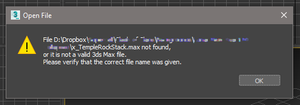
Can't open files in 3ds MAX that are on Dropbox
**Just thought I'd edit this top post** I think this has been resolved quietly by either Dropbox or Autodesk, as I no longer have any problems with syncing or anything. Hello all, Similar to t...

Megan Dropbox Community Moderator
4 years agoDropbox Community ModeratorHi lukaszwolenski, let me jump in here!
Are you using a Mac or a Windows device? Also, what is the exact error you get when you try to re-download files locally? If you could send me a screenshot, that'd be very helpful.
Keep me posted, and we'll take it from there!

samrikken
4 years agoExplorer | Level 3
Hi,
An update on this problem from our site.
The cause of the problem was indeed the online-only folders. With generally switching Dropbox to store locally it still kept some folders that were already sync to online-only. When manually switching these folders to local all was good.
🙂
About View, download, and export

Need support with viewing, downloading, and exporting files and folders from your Dropbox account? Find help from the Dropbox Community.
The Dropbox Community team is active from Monday to Friday. We try to respond to you as soon as we can, usually within 2 hours.
If you need more help you can view your support options (expected response time for an email or ticket is 24 hours), or contact us on X, Facebook or Instagram.
For more info on available support options for your Dropbox plan, see this article.
If you found the answer to your question in this Community thread, please 'like' the post to say thanks and to let us know it was useful!


