We’re Still Here to Help (Even Over the Holidays!) - find out more here.
Forum Discussion

alarson
8 years agoNew member | Level 2
Chrome reporting dropbox as an incompatible application
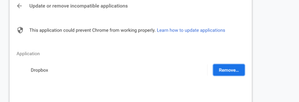
Receiving this error from chrome whenever i open chrome:
- 8 years ago
Hey folks ( office11 & chriscsullivan)!
Thanks for reporting this problem here. Without you, other customers could've experienced the same issue.
I have already relayed all the details of your problem to our engineering team. From this point onwards, they’ll evaluate the problem and work toward a solution.
I can’t say exactly how long this will take, however, I’ll keep a close watch on the team’s progress and I will let you know more info as soon as I have an update.
Thanks for your diligence and patience in regards to this matter and enjoy the rest of your day!

Walter Dropbox Community Moderator
8 years agoDropbox Community ModeratorHey there office11 - sorry to hear this.
As we've been getting such reports for a while now, I moved your post here to keep things neat.
Take a look at what other users posted about this Chrome specific error and if there's anything further I can do from my end to help, please let me know.
In the meantime, have a lovely week ahead!
PS: You can always use another browser other than Chrome till there's a fix rolled out. I know it's not optimal yet I sure hope it helps to some extent.

office11
8 years agoHelpful | Level 5
Unfortunately that is not an option for me as this is my work computer and all our email is setup through google chrome - so it isn't an option not to be using Chrome on a daily basis. Therefore the incompatability is a huge problem as it is making Chrome unstable.
- Walter8 years ago
Sorry about this office11 - have you updated your Chrome recently ?
I am actually updating mine to v.69 which should resolve this issue as my colleague Alexandra4 mentioned in the a previous reply (you'll find her post in the second page of this very thread).
I am putting it here for your convenience.
SpoilerTo provide some background, this doesn't affect the performance of your Dropbox desktop application. However, we're aware that this Google Chrome notification causes confusion and we have confirmed that this will be resolved in a future version (v69) of Chrome.In the meantime, you can open up another tab in Chrome and close the tab with the notification. Alternatively, you can install the beta version of Chrome from https://www.chromium.org/getting-involved/dev-channel.I know it's not optimal yet I sure hope this helps to some extent.
- office118 years agoHelpful | Level 5
my computer is set to do all updates automatically-so presumably it is already the most current version of Chrome. I have been closing the error message and starting new tabs, but very soon the whole thing becomes unstable and closes. Very frustrating. I don't think that I want to be part of any beta testing group - I am not particularly tech-savy and am having enough problems with this as it is - I don't need extra problems from becoming a guinea pig for a software rollout.
- Walter8 years ago
I understand office11 - I'm also extra wary when it comes to software updates, especially betas which are experimental builds and can lead to all kind of deficiencies.
Just out of curiosity, which version of Chrome are you currently using?I am attaching a screenshot to help find it:
About View, download, and export

Need support with viewing, downloading, and exporting files and folders from your Dropbox account? Find help from the Dropbox Community.
The Dropbox Community team is active from Monday to Friday. We try to respond to you as soon as we can, usually within 2 hours.
If you need more help you can view your support options (expected response time for an email or ticket is 24 hours), or contact us on X, Facebook or Instagram.
For more info on available support options for your Dropbox plan, see this article.
If you found the answer to your question in this Community thread, please 'like' the post to say thanks and to let us know it was useful!


