Our Community is in read-only mode until April 8th, learn more here. You can still search existing threads or get help via Dropbox Support, the Dropbox Help Center, or Learn.
Forum Discussion

Dimples
3 years agoHelpful | Level 5
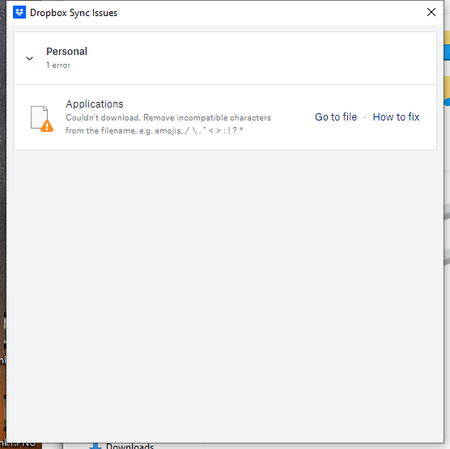
Couln't download. Remove incompatible characters from the filename
Recently all of my computer with Dropbox have started showing a sync error "Couln't download. Remove incompatible characters from the filename. e.g. emojis, /\"<>:|?*"
The problem filename isn'...
- 2 years ago
Hey Roy2010, no worries let me share Sam's response here as well.
Hi everyone,
Sharing an update on the topic: our team is working on adjusting this, and it's expected to roll out in our next Stable Build (V190).
You can check our releases here, and we'll keep you informed on the progress.
Thanks,
Sam
I appreciate your patience on this, thank you!

Megan Dropbox Community Moderator
4 years agoDropbox Community ModeratorHi Gabrielle Neal, welcome to our Dropbox Community!
Keep in mind that the syncing issue you described is most likely due to the OS on your device.
It's not coming directly from Dropbox, but some operating systems have certain characters that they don't accept.
You'd need to rename these files via the website, and they'd then sync without any problems.
You can see more about this right here.
I hope this clarifies things.
Keep in mind that the syncing issue you described is most likely due to the OS on your device.
It's not coming directly from Dropbox, but some operating systems have certain characters that they don't accept.
You'd need to rename these files via the website, and they'd then sync without any problems.
You can see more about this right here.
I hope this clarifies things.

Gabrielle Neal
4 years agoHelpful | Level 6
Sorry Megan, but no this link you supplied didn't clarify anything.
These files have appeared out of nowhere with a full colon inserted.
This is not our practice to create files in this manner.
Please, can someone please give us a better solution than "you will have to rename them yourself" or it is our "OS on our device".
I am sorry, but both of these sound like a cop out.
About View, Download, and Export

Get support with viewing, downloading, and exporting files and folders from your Dropbox account.
The Dropbox Community team is active from Monday to Friday. We try to respond to you as soon as we can, usually within 2 hours.
If you need more help you can view your support options (expected response time for an email or ticket is 24 hours), or contact us on X, Facebook or Instagram.
For more info on available support options for your Dropbox plan, see this article.
If you found the answer to your question in this Community thread, please 'like' the post to say thanks and to let us know it was useful!


