Your workflow is unique 👨💻 - tell us how you use Dropbox here.
Forum Discussion

SillyGoose23
1 month agoExplorer | Level 3
Download folder unaccessible after installing Dropbox
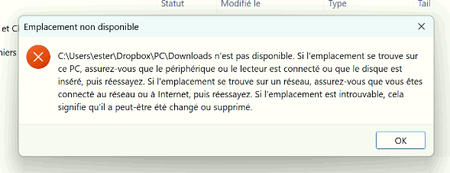
Device ASUS ROG Strix G712LV-BS71-CB laptop Operating System/Browser (if using the web) Windows 11 Dropbox App Version/Browser Version 237.4.5655 Question or Issue I'm supporting a user that I...
- 1 month ago
Hey there SillyGoose23 welcome to the community
It looks like Windows is trying to redirect your Downloads folder to a Dropbox Backup path like Dropbox\PC\Downloads, but that folder no longer exists. When this happens, Windows can’t resolve the folder location and downloads will fail until the folder path is restored.
Please check whether Dropbox Backup was ever enabled on this computer and turn it off if it’s active. You can find out more about that here https://help.dropbox.com/organize/how-to-use-dropbox-backup
Next, try restoring the Downloads folder location in Windows:
- Right click the Downloads folder in File Explorer.
- Select Properties then Location.
- Choose Restore Default, then apply.
Take a look at this and let us know the results

Dell_Dropbox Community Manager
1 month agoCommunity ManagerHey there SillyGoose23 welcome to the community
It looks like Windows is trying to redirect your Downloads folder to a Dropbox Backup path like Dropbox\PC\Downloads, but that folder no longer exists. When this happens, Windows can’t resolve the folder location and downloads will fail until the folder path is restored.
Please check whether Dropbox Backup was ever enabled on this computer and turn it off if it’s active. You can find out more about that here https://help.dropbox.com/organize/how-to-use-dropbox-backup
Next, try restoring the Downloads folder location in Windows:
- Right click the Downloads folder in File Explorer.
- Select Properties then Location.
- Choose Restore Default, then apply.
Take a look at this and let us know the results
About View, download, and export

Need support with viewing, downloading, and exporting files and folders from your Dropbox account? Find help from the Dropbox Community.
The Dropbox Community team is active from Monday to Friday. We try to respond to you as soon as we can, usually within 2 hours.
If you need more help you can view your support options (expected response time for an email or ticket is 24 hours), or contact us on X, Facebook or Instagram.
For more info on available support options for your Dropbox plan, see this article.
If you found the answer to your question in this Community thread, please 'like' the post to say thanks and to let us know it was useful!


