Our Community is in read-only mode until April 8th, learn more here. You can still search existing threads or get help via Dropbox Support, the Dropbox Help Center, or Learn.
Forum Discussion

Jo93
2 years agoExplorer | Level 4
Downloads folder isn't accessible. What can I do?
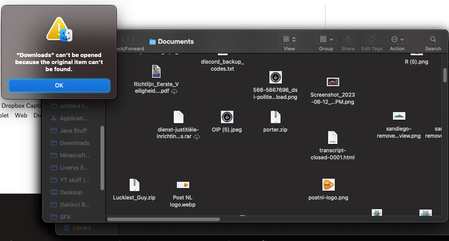
I cant acces my download's folder via dropbox. Is there i way i can safely delete dropbox and get back in my downloads folder?
- 2 years ago
Hey Jo93, I hope you're doing well!
Can you try these steps and let us know if they help?
- Open your Dropbox desktop app.
- Click the Dropbox icon in the menu bar at the top of your screen.
- Click your profile picture or initials in the upper right of the window that appears.
- Click Quit.
- Open a new Finder window.
- Click Applications.
- Double-click the Dropbox icon.
Keep us posted!

EvanDBX Dropbox Community Moderator
2 years agoDropbox Community ModeratorHey Jo93, I hope you're doing well!
Can you try these steps and let us know if they help?
- Open your Dropbox desktop app.
- Click the Dropbox icon in the menu bar at the top of your screen.
- Click your profile picture or initials in the upper right of the window that appears.
- Click Quit.
- Open a new Finder window.
- Click Applications.
- Double-click the Dropbox icon.
Keep us posted!

Jo93
2 years agoExplorer | Level 4
Well, I closed my dropbox like you told me. But when i open it from the application folder I can go into this menu in the photo but I cannot sign in or do anything

About View, Download, and Export

Get support with viewing, downloading, and exporting files and folders from your Dropbox account.
The Dropbox Community team is active from Monday to Friday. We try to respond to you as soon as we can, usually within 2 hours.
If you need more help you can view your support options (expected response time for an email or ticket is 24 hours), or contact us on X, Facebook or Instagram.
For more info on available support options for your Dropbox plan, see this article.
If you found the answer to your question in this Community thread, please 'like' the post to say thanks and to let us know it was useful!


