We’re Still Here to Help (Even Over the Holidays!) - find out more here.
Forum Discussion

Shawn B.14
6 years agoHelpful | Level 6
Dropbox is stuck syncing after an update, what can I do?
I have the "Dropbox Plus" subscription and I run the client on 4 computers.
Yesterday (Monday, 13-Jan-2020) I signed onto my desktop (which is always on) and has a full local sync of my dropbox...

S34W0LF
6 years agoHelpful | Level 6
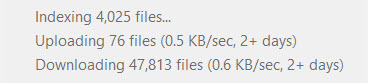
An update from my side: Progress has been made with @Server_Align @AlignAdmin solution, but the problem is not solved yet, from just seeing "Syncing..." with no other info, I am now in a state that I am seemingly syncing, but very slowly (if at all, I can not tell, the number of pending files to be "downloaded" and "indexed" remain very high as you can see on the screenshot attached).
Any ideas on how to go back to normal syncing speeds? (or unstuck, not sure if I am syncing at all)

Matt F.16
6 years agoCollaborator | Level 9
@S34WOLF - I was in the same boat as you and documented the solution (for me) on page 12 of this thread: https://www.dropboxforum.com/t5/Files-folders/Dropbox-is-stuck-syncing-after-an-update-what-can-I-do/m-p/392419/highlight/true#M142599
- S34W0LF6 years agoHelpful | Level 6
Thank you Matt F.16 . I am on windows, I have found and deleted symlinks (just two), and also fixed permissions both with the "Fix Permission" button and the command line commands Dropbox support has sent me but haven't solved the issue.
Further investigation/experimentation led me to this:
It seems that the dropbox.exe process is "blocked" by another thread. I right clicked on the Dropbox.exe process and chose "Analyse wait chain":
This gave me the following interesting message. Dropbox is waiting for some other process on Thread 9236 to finish and release *network* I/O:
I downloaded "Process Explorer" from Microsoft (here: https://docs.microsoft.com/en-us/sysinternals/downloads/process-explorer) to see what this Thread is (right click on Dropbox.exe process in Process Explorer, choose Proporties, then "Threads" tab:
So ucrtbase.dll seems to be involved. Doubleclicking on the Thread gives this stack of "core" Windows10 dlls and exe files:This is the furthest I can go with my technical understanding, and I am reporting it so that others may dig further and reach a solution.
(Note: to see the threads on my PC I had to install "Debugging Tools for Windows" from the Windows 10 SDK (here:https://developer.microsoft.com/en-us/windows/downloads/windows-10-sdk . On the installer choose only to install:"Debugging Tools for Windows" to save disc space and time:
- S34W0LF6 years agoHelpful | Level 6
SOLVED!: As I was browsing the threads that were related to dropbox.exe, I saw that boxifier had some threads, which was weird as I had it closed. So I unistalled boxifier, restarted the PC, and it synced fully! I am not sure whether it was just boxifier or a combination of all the other issues that I tackled (symlinks, permissions etc), the thing is I am fully operational now, and all new changes get synced as before.
Thanks to all people that helped!
 Ronald H.6 years agoHelpful | Level 6
Hi S34WOLF:
I am also a Boxifier user too because I wanted to sync files in their current folder locations and not move them to the designated Dropbox folder. These are usually in the "Boxifier" folder under the Dropbox folder, and these contain the links to to external folders outside the Dropbox folder structure.
Can you tell us all a little more what happened to the "Boxifer" folder after you uninstalled Boxifier, and what you will do now?
FYI, I contacted Boxifier support who told me (in part): "Dropbox has introduced a new sync engine ("Nucleus") that at the moment is not advertised and it is only available to some users. The team discovered an incompatibility between Boxifier and this new sync engine and is working to solve this problem. We have released a beta last week which includes support for the new sync engine of Dropbox. Could you please give it a try and let me know if it makes any difference for you?"
The Boxifier Beta did not make any difference, so I am wondering which side to try to tackle this problem: Dropbox or Boxifier.
Thank you!
Ronald
About View, download, and export

Need support with viewing, downloading, and exporting files and folders from your Dropbox account? Find help from the Dropbox Community.
The Dropbox Community team is active from Monday to Friday. We try to respond to you as soon as we can, usually within 2 hours.
If you need more help you can view your support options (expected response time for an email or ticket is 24 hours), or contact us on X, Facebook or Instagram.
For more info on available support options for your Dropbox plan, see this article.
If you found the answer to your question in this Community thread, please 'like' the post to say thanks and to let us know it was useful!


