Your workflow is unique 👨💻 - tell us how you use Dropbox here.
Forum Discussion

expedite
7 months agoNew member | Level 2
Files sync to my computer as "online-only" despite the settings being set to "available offline".
I uploaded files from my android phone to dropbox. I see the files in my win 11 laptop but with a cloud sign next to it. On opening the file, it downloads. Hence the automatic download isn't working....
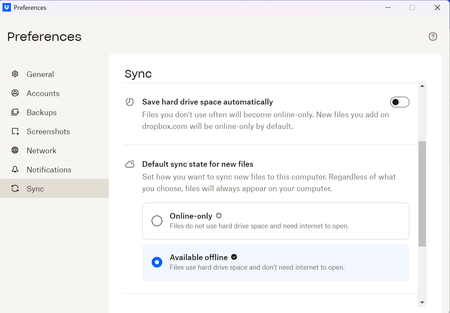
- 7 months ago
Hey expedite, thanks for the speedy reply!
Here's why I'm suggesting to make sure that the folders these files are added to are set as available offline:
If there are any folder-specific policies (such as a folder set to online-only), those settings may override the general offline availability, and the new files may remain online-only unless the folder is also set to be available offline.
This ensures that any content added from a mobile device is quickly accessible on the computer, both online and offline, according to the sync and availability settings.
Can you try manually changing a folder to be available offline, and then adding some files to it using your mobile app to check if that changes things?


expedite
7 months agoNew member | Level 2
Thanks for your quick response. The version is 227.4.4774. My goal here is auto download for the computer. I am aware of the manual workaround.
- Megan7 months ago
Dropbox Community Moderator
Hey expedite, thanks for the speedy reply!
Here's why I'm suggesting to make sure that the folders these files are added to are set as available offline:
If there are any folder-specific policies (such as a folder set to online-only), those settings may override the general offline availability, and the new files may remain online-only unless the folder is also set to be available offline.
This ensures that any content added from a mobile device is quickly accessible on the computer, both online and offline, according to the sync and availability settings.
Can you try manually changing a folder to be available offline, and then adding some files to it using your mobile app to check if that changes things?
About View, Download, and Export

Get support with viewing, downloading, and exporting files and folders from your Dropbox account.
The Dropbox Community team is active from Monday to Friday. We try to respond to you as soon as we can, usually within 2 hours.
If you need more help you can view your support options (expected response time for an email or ticket is 24 hours), or contact us on X, Facebook or Instagram.
For more info on available support options for your Dropbox plan, see this article.
If you found the answer to your question in this Community thread, please 'like' the post to say thanks and to let us know it was useful!


