Your workflow is unique 👨💻 - tell us how you use Dropbox here.
Forum Discussion

Methuselah
7 years agoExplorer | Level 4
Folder has too many files to download - iOS Version 11.4
I am a Dropbox Plus user with 1TB of files in Dropbox currently syncing most of my files offline on my iPad (tons of spare memory capacity fyi). These files are broken into ~259 folders with ~2100 fi...
- 7 years agoHi Methuselah, thanks for getting back to me on this.However, due to account sensitive info and because I’d have to investigate using our internal tools so as to narrow down the issue, we need to move forward with the email interaction.Cheers! :nerd:

Lusil Dropbox Staff
7 years agoDropbox StaffHi Methuselah, thanks for getting back to me on this.
However, due to account sensitive info and because I’d have to investigate using our internal tools so as to narrow down the issue, we need to move forward with the email interaction.
Cheers! :nerd:

Methuselah
7 years agoExplorer | Level 4
Hi Lusil,
Thanks for that. I ran the checks and there were no issues. Happy to proceed with the email interaction btw.
Kind regards,
Bernard
 pitmac7 years agoExplorer | Level 4
Hi all,
i've the same Problem...how did it resolved?
Thx,
Pit
- Lusil7 years agoHi there, Pit. :slight_smile:I’d be more than happy to help, but first, could you please provide a bit more info so as to have a better understanding of your concern?For example, what are the steps you’re taking? Are you trying to make files offline on a mobile device? Is this concerning the desktop app? Are you not seeing content being downloaded locally?Any additional details, as well as screenshots (omitting personal info) would be very helpful. Thanks in advance!
- pitmac7 years agoExplorer | Level 4
Hi Lusil,
sorry for the delay.
Yes i will et the files offline on my iPad Pro.
I'll will sent you a screenshot:
Screenshot from my iPadCheers,
Pit
- Methuselah6 years agoExplorer | Level 4
Hi again,
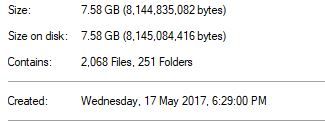
I'm still having sync problems (albeit with the current iOS - 12.3.1). Despite constantly deleting and re-syncing folders, I am regulary confronted with sync warnings like these (2 example images attached - one showing an attempt too sync, the other a 'warning' error?).
In some instances I have spent hours re-openeing every folder before it will show the green sync tick - though inevitably, to only have the orange error flag reappear.
It is absurd that I have to incur the cost of so much data (and my time!) to only have the problem reoccur. I depend on being able to access my files when I am unable to get an internet connection, even when the cost of synchronising mass downloads is less important than just being able to access them.
Additionaly, I'm paying a subscription for a service that's not delivering even close to it promise i.e. 100 Folder and 10,000 files (you'll see my Properties images of the two folder examples I've shown demonstrating the file and folder quantity is well below these numbers).
Can you please advise a solution?
- Lusil6 years agoThanks for your swift reply, Methuselah.Just to ensure that we cover some additional troubleshooting ground on this, could you please let me know if forcing the offline folders to be updated does the trick?To do this, ensure that you’re connected to a network and:1. Open the mobile app.2. Tap on Account.3. From the options given, select Manage offline files.4. Tap on the spinning arrow icon that’s on the top right corner of your screen.Let me know how it goes!
- Methuselah6 years agoExplorer | Level 4
Hi Lusil,
No change, the same folders remain with the orange error flag.
About View, Download, and Export

Get support with viewing, downloading, and exporting files and folders from your Dropbox account.
The Dropbox Community team is active from Monday to Friday. We try to respond to you as soon as we can, usually within 2 hours.
If you need more help you can view your support options (expected response time for an email or ticket is 24 hours), or contact us on X, Facebook or Instagram.
For more info on available support options for your Dropbox plan, see this article.
If you found the answer to your question in this Community thread, please 'like' the post to say thanks and to let us know it was useful!


