We’re Still Here to Help (Even Over the Holidays!) - find out more here.
Forum Discussion

jrockel
6 years agoExplorer | Level 3
How can I move multiple files using the Dropbox site?
I'm sorry, but I put this in the wrong thread. I have been looking for a solution to moving multiple files on the web app. I'm not using a phone or a tablet, just a web interface. When I sellect mult...
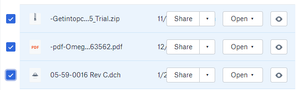
jrockel
6 years agoExplorer | Level 3
Wow! That is really obscure. I guess I'm too old, cuz I don't like hidden menus. Thanks!

Jay Dropbox Community Moderator
6 years agoDropbox Community Moderator Mirage0756 years agoExplorer | Level 4
Sorry to jump in on this but my question is about the speed of moving files. As the procedure described in this thread is exactly what I'm doing I thought it would be easiest to post my question here.
So when moving multiple files that are ONLY in the cloud, so not locally stored anywhere, it seems to take forever and is using a lot of local CPU power. Why is this? Is there anything I can do to improve the speed?
I have roughly 15k pictures in my camera uploads folder going back to 2015 that I'm now trying to move to yearly folders so they are more easy to sort. It took 2 hours to move 900 pictures so far and I can only do smaller batches as moving too many makes the system crash.
Thanks for your help
- Daphne6 years ago
Thanks for joining the discussion here Mirage075!
Could you clarify for me if it's the action of moving of the files, or the sync afterwards that's taking a lot of time to process?
Let me know and we can go from there!
- Mirage0756 years agoExplorer | Level 4Hi Daphne,
it's the action of moving of the files that takes forever. The files are not on a local drive, only on Dropbox.
Thanks,
Tom

About View, download, and export

Need support with viewing, downloading, and exporting files and folders from your Dropbox account? Find help from the Dropbox Community.
The Dropbox Community team is active from Monday to Friday. We try to respond to you as soon as we can, usually within 2 hours.
If you need more help you can view your support options (expected response time for an email or ticket is 24 hours), or contact us on X, Facebook or Instagram.
For more info on available support options for your Dropbox plan, see this article.
If you found the answer to your question in this Community thread, please 'like' the post to say thanks and to let us know it was useful!


