Our Community is in read-only mode until April 8th, learn more here. You can still search existing threads or get help via Dropbox Support, the Dropbox Help Center, or Learn.
Forum Discussion

amcoffice
1 year agoExperienced | Level 11
How can I preview my files in full-screen mode on the website and not in quick view?
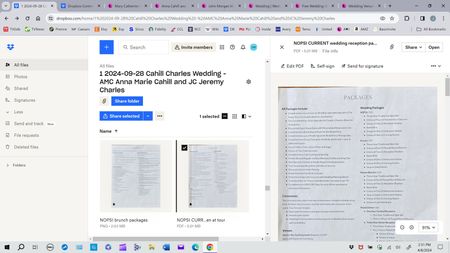
Suddenly I cannot open and files (documents or photos) in full-screen mode. Instead I get a split screen with the file shown only on the far-right third of the page. Is there some new way to open a f...
- 1 year ago
Hey amcoffice, thanks for reaching out to us on the Dropbox Community.
We really appreciate your comments on this feature and I wanted to let you know that I've passed your feedback to our team.
If you'd like to open your files in full-screen mode, you can simply click on the "open" button at the top right corner of the "quick view" preview and the file will open in full screen.
You can also disable quick view, if you want.
At the top right corner of your "all files" page, you'll see the following button, which will allow you to switch to full-screen previews.
I hope this helps, but let me know if you need anything else!

Hannah Dropbox Community Moderator
1 year agoDropbox Community ModeratorHey amcoffice, thanks for reaching out to us on the Dropbox Community.
We really appreciate your comments on this feature and I wanted to let you know that I've passed your feedback to our team.
If you'd like to open your files in full-screen mode, you can simply click on the "open" button at the top right corner of the "quick view" preview and the file will open in full screen.
You can also disable quick view, if you want.
At the top right corner of your "all files" page, you'll see the following button, which will allow you to switch to full-screen previews.
I hope this helps, but let me know if you need anything else!

ostrichteeth
1 year agoExplorer | Level 4
I have the same issue. Why would they even have a side bar at all? Dropbox is the absolute worst.
About View, Download, and Export

Get support with viewing, downloading, and exporting files and folders from your Dropbox account.
The Dropbox Community team is active from Monday to Friday. We try to respond to you as soon as we can, usually within 2 hours.
If you need more help you can view your support options (expected response time for an email or ticket is 24 hours), or contact us on X, Facebook or Instagram.
For more info on available support options for your Dropbox plan, see this article.
If you found the answer to your question in this Community thread, please 'like' the post to say thanks and to let us know it was useful!


