Your workflow is unique 👨💻 - tell us how you use Dropbox here.
Forum Discussion

ABC_999
2 years agoExplorer | Level 3
Syncing doesn't work. A few files change and hours later they still haven't showed up to the web.
I wanted a solution to have files backed up online (typical dropbox) but I also have certain files (a few handfuls) I need always available when I am offline (off the internet). I am often offline f...

ABC_999
2 years agoExplorer | Level 3
@walter
As I said there is no app in either the upper or lower bar showing Dropbox - I was told by support that IOS ventura doesn't run an app.
However, when I go to the applications folder and do Get Info on the dropbox app is says:
I have no idea if that app actually is what is running.
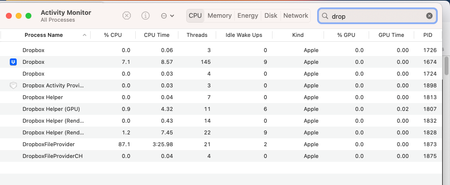
I gave you in the original message a picture showing a list of the dropbox processes running.
The support calls were done via phone, no support ticket number was ever given to me.
This looks like a Ventura problem - please respond with any help.

Jay Dropbox Community Moderator
2 years agoDropbox Community ModeratorHi ABC_999, could you try the steps in this thread to see if you can find the Dropbox icon?
- ABC_9992 years agoExplorer | Level 3
I had found another thread that gave some hints on how to show the dropbox app on ventura.
So 2 hours of my effort with support now used up to get this far (plus many hours on my own searching dropbox forums and messing with dropbox to try and get it working and see what was going on) ...
Here is the app version on the laptop
Mobile apps are all updated as new updates come out so 100% updated.
Problems:
1) New file added to laptop does not update even when dropbox is running, even when I have been on a strong internet for many hours and no other files were updated and the updated file is small - hours later still not updated to the internet. This happened immediately after a new install to the current version - all symptoms happened since dropbox paid version was installed. To get the updated files to the internet, I have to manually copy them.
2) On mobile devices, the files inside the offline folders are not accessible when not on the internet. They are accessible when on the internet and marked offline, then when offline for a few days/weeks, the files show a yellow triangle with a ! or say "unexpected error".
- ABC_9992 years agoExplorer | Level 3Still not receiving any help for this problem.
- Hannah2 years ago
Sorry to jump in here, ABC_999.
Can you please let us know which steps you followed to get to the Dropbox version in your screenshot?
Were you able to locate the Dropbox icon? And if so, what do you see when hovering over it? We're particularly interested in the sync status.
Also, if you can give us the ticket number for your communication with our support team, we'd greatly appreciate it.

About View, Download, and Export

Get support with viewing, downloading, and exporting files and folders from your Dropbox account.
The Dropbox Community team is active from Monday to Friday. We try to respond to you as soon as we can, usually within 2 hours.
If you need more help you can view your support options (expected response time for an email or ticket is 24 hours), or contact us on X, Facebook or Instagram.
For more info on available support options for your Dropbox plan, see this article.
If you found the answer to your question in this Community thread, please 'like' the post to say thanks and to let us know it was useful!


