Your workflow is unique 👨💻 - tell us how you use Dropbox here.
Forum Discussion

dwtcd
5 years agoExplorer | Level 4
I can't edit my Excel file when I open it on my iPad
Hi,
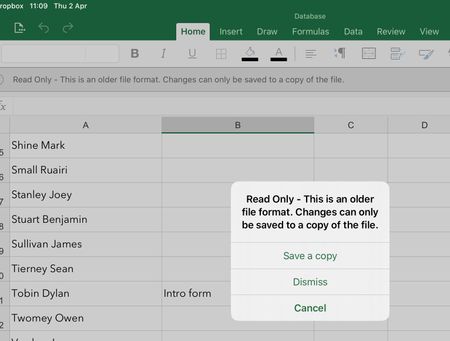
I'm using Dropbox on my iPad and opening excel files in the Dropbox App. When I want to edit them, I'm tapping 'Open' on the file in the Dropbox app. Which then opens the File in the Excel app....
- 5 years ago
As the message states, the file is more than likely in an older Excel file format (2007 or older). Newer versions of Excel save files in a different format. While you can open and view the older formats, you usually can't edit them in the iOS apps. This is a Microsoft issue, and unrelated to Dropbox.

Rich Super User II
5 years agoSuper User IIAs the message states, the file is more than likely in an older Excel file format (2007 or older). Newer versions of Excel save files in a different format. While you can open and view the older formats, you usually can't edit them in the iOS apps. This is a Microsoft issue, and unrelated to Dropbox.

dwtcd
5 years agoExplorer | Level 4
Ah,
Ok, that makes sense.
Thanks for your help.
DWTCD
About Delete, Edit, and Organize
Solve issues with deleting, editing, and organizing files and folders in your Dropbox account.
The Dropbox Community team is active from Monday to Friday. We try to respond to you as soon as we can, usually within 2 hours.
If you need more help you can view your support options (expected response time for an email or ticket is 24 hours), or contact us on X, Facebook or Instagram.
For more info on available support options for your Dropbox plan, see this article.
If you found the answer to your question in this Community thread, please 'like' the post to say thanks and to let us know it was useful!


