We’re Still Here to Help (Even Over the Holidays!) - find out more here.
Forum Discussion

rlawrence2
9 years agoHelpful | Level 5
I can't see an option to delete photos from the Photos directory
Ok, read threads that say "Delete" is there and I still don't see it. I do on the "Files" screen, but not the Photos directory. Looking online in Firefox, I get NO option to delete a photo when se...
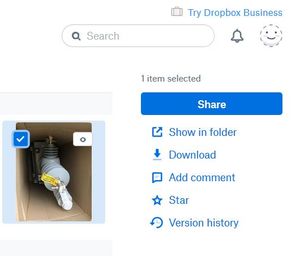
- 9 years agoYou can no longer delete from the Photos page. You need to select a photo and choose View in folder. From there you can delete it.

Rich Super User II
9 years agoSuper User II
rlawrence2 wrote:
you cannot "see" a photo file and certainly don't know the name of the file to delete un files folder.
When you click Show in folder, the file is already selected in the File view. Just click Delete.

Smorss2011
8 years agoNew member | Level 2
How inelegant and clumsy. You need to hire a U/I person.
- Rich8 years ago
As they've been slowly removing most photo-centric features over the last couple years, they likely don't care.
About Delete, edit, and organize
Solve issues with deleting, editing, and organizing files and folders in your Dropbox account with support from the Dropbox Community.
The Dropbox Community team is active from Monday to Friday. We try to respond to you as soon as we can, usually within 2 hours.
If you need more help you can view your support options (expected response time for an email or ticket is 24 hours), or contact us on X, Facebook or Instagram.
For more info on available support options for your Dropbox plan, see this article.
If you found the answer to your question in this Community thread, please 'like' the post to say thanks and to let us know it was useful!


