Your workflow is unique 👨💻 - tell us how you use Dropbox here.
Forum Discussion

thedomorefoundation2017
1 month agoExplorer | Level 3
I renamed one of my folders and now all of its files have disappeared.
Question or Issue
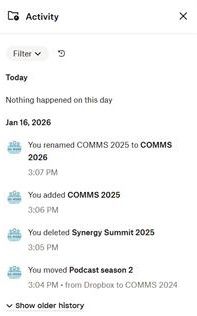
On Fri 16 Jan 2026, I was organising Dropbox and instead of creating a new folder for Comms 2026, I renamed a current folder called Comms 2025 to Comms 2026. Now I can't find...

Nancy Dropbox Community Moderator
1 month agoDropbox Community ModeratorThanks for your post today, thedomorefoundation2017!
Renaming a folder on Dropbox shouldn’t have an effect on the files that are stored within, so let’s have a look into this.
Right before renaming your folder to “COMMS 2026”, were you able to see all of your older files/subfolders within?
I can see that there’s a folder called “Synergy Summit 2025” in your screenshot, which appears to have been deleted. Is this one of the folders that you’re now missing and, if yes, can you see it under your Events page here?
Finally, I’d like a screenshot of the dropdown subfolder that you mention in your “COMMS 2026” folder.
Let me know, once you have more info.
About Delete, Edit, and Organize
Solve issues with deleting, editing, and organizing files and folders in your Dropbox account.
The Dropbox Community team is active from Monday to Friday. We try to respond to you as soon as we can, usually within 2 hours.
If you need more help you can view your support options (expected response time for an email or ticket is 24 hours), or contact us on X, Facebook or Instagram.
For more info on available support options for your Dropbox plan, see this article.
If you found the answer to your question in this Community thread, please 'like' the post to say thanks and to let us know it was useful!


