Need to see if your shared folder is taking up space on your dropbox 👨💻? Find out how to check here.
Forum Discussion

Naif5
2 years agoExplorer | Level 3
Issue with moving/renaming files
Hi everyone,
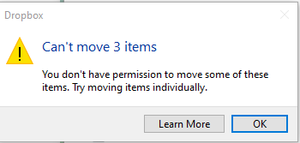
When I try to move or rename shared files in Dropbox Desktop, I encounter these errors, but it works fine on Dropbox Web. Any ideas?
1- when I tried to move the files:
...

Naif5
2 years agoExplorer | Level 3
Hi there,
I'm referring to shared folders, and I'm not the owner of these folders.
When I click on the 'Learn More' button, it directs me to the Dropbox website at this link: https://help.dropbox.com/organize/team-space-overview#moveout

Walter Dropbox Community Moderator
2 years agoDropbox Community ModeratorI see, thanks for the additional information Naif5
Do you happen to know if these shared folders are shared from a team account or an individual one?
Also, what is your computer's exact OS and the version and status of the Dropbox desktop app as shown in your system tray?
About Delete, edit, and organize
Solve issues with deleting, editing, and organizing files and folders in your Dropbox account with support from the Dropbox Community.
The Dropbox Community team is active from Monday to Friday. We try to respond to you as soon as we can, usually within 2 hours.
If you need more help you can view your support options (expected response time for an email or ticket is 24 hours), or contact us on X, Facebook or Instagram.
For more info on available support options for your Dropbox plan, see this article.
If you found the answer to your question in this Community thread, please 'like' the post to say thanks and to let us know it was useful!


