Your workflow is unique 👨💻 - tell us how you use Dropbox here.
Forum Discussion

milaaaa
2 hours agoHelpful | Level 5
Paper: Find + Replace (with blanks) doesn't work
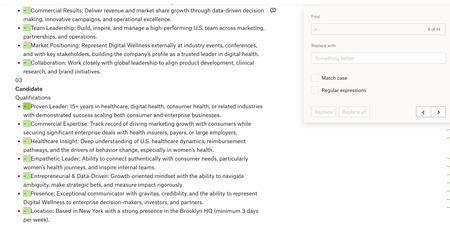
Device: Macbook Operating System/Browser (if using the web): macOS Tahoe 26.3.1, Chrome Dropbox App Version: Paper Question or Issue Whenever I try using Find & Replace in Dropbox Paper, I ...

Megan Dropbox Community Moderator
1 hour agoDropbox Community ModeratorHi there, milaaaa, let's see what we can find about this together!
I just tested this on my end, and it looks like the feature worked the way it was intended to.
However, keep in mind that when it came to replacing the "-" with a blank space, I actually had to press space on the "Replace with" window. Is it safe to assume you're trying the same thing?
I'm asking because you'd need to use something in the "Replace with" window in order for this to work. Leaving it blank indeed doesn't allow you to make the change.
If you use a space to change the dash symbol on your Paper documents, does it work? If not, then could you use an entirely different browser, or incognito tab in order to see if the behavior remains the same there?
Keep me posted, and we'll take it from there!
About Delete, Edit, and Organize
Solve issues with deleting, editing, and organizing files and folders in your Dropbox account.
The Dropbox Community team is active from Monday to Friday. We try to respond to you as soon as we can, usually within 2 hours.
If you need more help you can view your support options (expected response time for an email or ticket is 24 hours), or contact us on X, Facebook or Instagram.
For more info on available support options for your Dropbox plan, see this article.
If you found the answer to your question in this Community thread, please 'like' the post to say thanks and to let us know it was useful!


