Your workflow is unique 👨💻 - tell us how you use Dropbox here.
Forum Discussion

JamesOBVDS
4 years agoExplorer | Level 4
Sort by name not working on DropBox app for Mac.
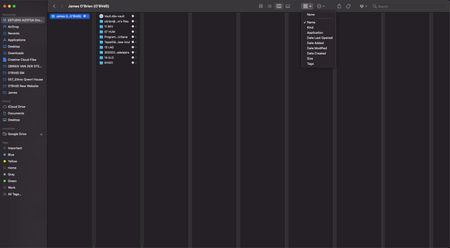
Hi, could someone please let me know why the folders in my dropbox application for desktop on Mac are not being ordered correctly by name? The settings are set so that they should be, and all other f...

Jay Dropbox Community Moderator
4 years agoDropbox Community ModeratorHi JamesOBVDS, thanks for bringing this to our attention.
Could you try selecting that specific column with your folders (the second one) and sorting the files and folders by name?
Keep me updated with any progress!
Could you try selecting that specific column with your folders (the second one) and sorting the files and folders by name?
Keep me updated with any progress!

JamesOBVDS
4 years agoExplorer | Level 4
hi, thanks for your reply. I have tried that, it doesn't make any difference, the folders and files still stay in the same random order. For every other way of organising available in that drop down Finder menu, they change and arrange themselves as they should, but for some reason with 'Name' it doesn't make any difference.
- Jay4 years agoDo you experience the same issue when quitting the Dropbox desktop application and sorting the files again?
- JamesOBVDS4 years agoExplorer | Level 4
Yes, it is the same when i quit and reopen.
James
- Jay4 years agoThanks for the info, I'd recommend getting in contact with the support team directly for further assistance.
Once you get a ticket ID from the automated response, please let me know the number here so I can locate it in our system.
About Delete, Edit, and Organize
Solve issues with deleting, editing, and organizing files and folders in your Dropbox account.
The Dropbox Community team is active from Monday to Friday. We try to respond to you as soon as we can, usually within 2 hours.
If you need more help you can view your support options (expected response time for an email or ticket is 24 hours), or contact us on X, Facebook or Instagram.
For more info on available support options for your Dropbox plan, see this article.
If you found the answer to your question in this Community thread, please 'like' the post to say thanks and to let us know it was useful!


