Your workflow is unique 👨💻 - tell us how you use Dropbox here.
Forum Discussion

anotherprofile
1 month agoHelpful | Level 6
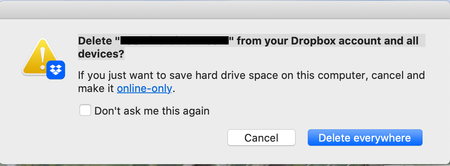
What does the "Delete from your Dropbox account and all devices" message mean?
Using the macOS desktop app.
I'm deleting files from Dropbox via Finder like I do in non-Dropbox folders.
Please explain what it's asking simply, I do not understand and do not want to do ...

anotherprofile
1 month agoHelpful | Level 6
Thank you for the explanation!
That's how I expect it to act because it is a cloud service so device doesn't matter – it's a cloud, not a per-device or local storage. Just a "portal" to Dropbox servers. So I guess it is just reminding me of what Dropbox is...strange.
- Rich1 month ago
Super User II
anotherprofile wrote:
it's a cloud, not a per-device or local storage. Just a "portal" to Dropbox servers.
That's not accurate. The Dropbox folder on your computer is an actual folder on your local drive. Anything stored in the folder exists on your local storage, and any changes you make in the folder sync to the local folder on all other devices that are linked to your account.
This is why you receive that message. It's making sure you understand that deleting a file from your local Dropbox folder will delete it from the Dropbox folder on all other devices linked to your account.
anotherprofile wrote:
Which option to choose to completely delete it everywhere on Dropbox (for me and for anyone else, I don't need the file and don't want it taking up space in my account)
You appear to be deleting a shared folder. Doing so temporarily removes it from your account. It has no effect on any other members. They keep their access. If you want to permanently remove it (again, only from your account) you need to remove your access to the folder.
If you're the owner of the shared folder and you want to remove it for every member, you need to unshare the folder.

About Delete, Edit, and Organize
Solve issues with deleting, editing, and organizing files and folders in your Dropbox account.
The Dropbox Community team is active from Monday to Friday. We try to respond to you as soon as we can, usually within 2 hours.
If you need more help you can view your support options (expected response time for an email or ticket is 24 hours), or contact us on X, Facebook or Instagram.
For more info on available support options for your Dropbox plan, see this article.
If you found the answer to your question in this Community thread, please 'like' the post to say thanks and to let us know it was useful!


