Your workflow is unique 👨💻 - tell us how you use Dropbox here.
Forum Discussion

anotherprofile
1 month agoHelpful | Level 6
What does the "Delete from your Dropbox account and all devices" message mean?
Using the macOS desktop app.
I'm deleting files from Dropbox via Finder like I do in non-Dropbox folders.
Please explain what it's asking simply, I do not understand and do not want to do ...
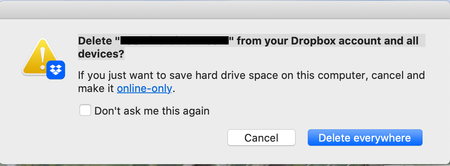

anotherprofile
1 month agoHelpful | Level 6
I have another question: different variation above. I want to delete it (for me and everyone... which is what I always want to do in this situation).
Which option to choose to completely delete it everywhere on Dropbox (for me and for anyone else, I don't need the file and don't want it taking up space in my account). Also: I clicked "see members" to see if that would clarify and...nothing happened at all. Not user friendly at all.

Theresa Community Manager
1 month agoCommunity ManagerHi anotherprofile and welcome back to the Dropbox Community - it's great to have you here. I am glad to see your first question about deleting files was answered and great to hear that everything is much clearer now.
By the way, I’m Theresa 👩💻, one of the community managers here at Dropbox HQ. Since you’ve been digging into how file deletion works, I’d love to know… how do you usually use Dropbox? I’m always curious how people fit Dropbox into their day-to-day.
Looking forward to hearing more,
T 😺 (Dropbox Community Manager)
- anotherprofile1 month agoHelpful | Level 6
Hi could you please answer my question? Thank you.
- Rich1 month ago
Super User II
anotherprofile wrote:
Hi could you please answer my question?
If you're referring to the question about deleting it for you and anyone else as well, I responded about 35 minutes after you asked. You can see the response above, or by clicking this link.
- anotherprofile1 month agoHelpful | Level 6
Thank you, I didn't see it above until you posted this.
I appreciate the explanation however I do not understand the shared folder aspect.
I created the folder to share some preliminary files with someone to get feedback for a final product. I never use the shared features because I always find that it complicates things not just with Dropbox but with all sorts of apps. Instead I just copied the link of the folder and pasted it for them but I did notice the folder had the shared icon on it instead of the normal plain folder icon and wondered why it looked like that.
How did it become a "shared folder" if I didn't specifically make it one? If I delete files I no longer want my client to have access to via the way I was doing so above, are you saying the folder will still exist on their end until they decide to delete it? If so, how do I turn this off? I just want to work with normal folders and have full control of them when I delete them which is what I've thought it's always done in this situation.

About Delete, Edit, and Organize
Solve issues with deleting, editing, and organizing files and folders in your Dropbox account.
The Dropbox Community team is active from Monday to Friday. We try to respond to you as soon as we can, usually within 2 hours.
If you need more help you can view your support options (expected response time for an email or ticket is 24 hours), or contact us on X, Facebook or Instagram.
For more info on available support options for your Dropbox plan, see this article.
If you found the answer to your question in this Community thread, please 'like' the post to say thanks and to let us know it was useful!


