Your workflow is unique 👨💻 - tell us how you use Dropbox here.
Forum Discussion

anotherprofile
1 month agoHelpful | Level 6
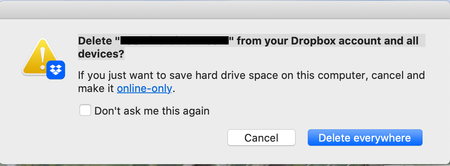
What does the "Delete from your Dropbox account and all devices" message mean?
Using the macOS desktop app.
I'm deleting files from Dropbox via Finder like I do in non-Dropbox folders.
Please explain what it's asking simply, I do not understand and do not want to do ...

anotherprofile
1 month agoHelpful | Level 6
Hi could you please answer my question? Thank you.

Rich Super User II
1 month agoSuper User IIanotherprofile wrote:Hi could you please answer my question?
If you're referring to the question about deleting it for you and anyone else as well, I responded about 35 minutes after you asked. You can see the response above, or by clicking this link.
- anotherprofile1 month agoHelpful | Level 6
Thank you, I didn't see it above until you posted this.
I appreciate the explanation however I do not understand the shared folder aspect.
I created the folder to share some preliminary files with someone to get feedback for a final product. I never use the shared features because I always find that it complicates things not just with Dropbox but with all sorts of apps. Instead I just copied the link of the folder and pasted it for them but I did notice the folder had the shared icon on it instead of the normal plain folder icon and wondered why it looked like that.
How did it become a "shared folder" if I didn't specifically make it one? If I delete files I no longer want my client to have access to via the way I was doing so above, are you saying the folder will still exist on their end until they decide to delete it? If so, how do I turn this off? I just want to work with normal folders and have full control of them when I delete them which is what I've thought it's always done in this situation.
- Rich1 month ago
anotherprofile wrote:
How did it become a "shared folder" if I didn't specifically make it one?
A folder can't become shared on its own. If it has the share icon, then you either invited someone to the folder and you're the owner, or it's a folder that you were invited to by someone else and they're the owner. Creating a link to a folder, regardless of whether it's a view-only or edit link, doesn't change the icon of the folder.
anotherprofile wrote:
If I delete files I no longer want my client to have access to via the way I was doing so above, are you saying the folder will still exist on their end until they decide to delete it?
If it's a shared folder and you simply delete the folder from your account, you're not unsharing it or removing anyone elses access. You're just removing your own access temporarily. Any other member will still have access to the folder.
If you own the folder and you don't want anyone else to have access, you need to unshare the folder. Unsharing a folder turns it back to a regular folder.
- anotherprofile1 month agoHelpful | Level 6
Thank you for the response.
I created a folder like I always do and then copied the URL by right clicking the folder and then pasting that link in a text message to them. I did not create a shared folder, it just was one. I do not understand why the application has changed its behavior. I've been using Dropbox since the late 2000s and this isn't normal app behavior.
About Delete, Edit, and Organize
Solve issues with deleting, editing, and organizing files and folders in your Dropbox account.
The Dropbox Community team is active from Monday to Friday. We try to respond to you as soon as we can, usually within 2 hours.
If you need more help you can view your support options (expected response time for an email or ticket is 24 hours), or contact us on X, Facebook or Instagram.
For more info on available support options for your Dropbox plan, see this article.
If you found the answer to your question in this Community thread, please 'like' the post to say thanks and to let us know it was useful!


