Your workflow is unique 👨💻 - tell us how you use Dropbox here.
Forum Discussion

anotherprofile
1 month agoHelpful | Level 6
What does the "Delete from your Dropbox account and all devices" message mean?
Using the macOS desktop app.
I'm deleting files from Dropbox via Finder like I do in non-Dropbox folders.
Please explain what it's asking simply, I do not understand and do not want to do ...
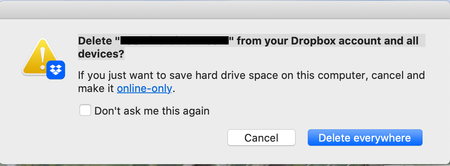

anotherprofile
1 month agoHelpful | Level 6
Thank you for the response.
I created a folder like I always do and then copied the URL by right clicking the folder and then pasting that link in a text message to them. I did not create a shared folder, it just was one. I do not understand why the application has changed its behavior. I've been using Dropbox since the late 2000s and this isn't normal app behavior.

Mark Super User II
1 month agoSuper User IIanotherprofile wrote:I created a folder like I always do and then copied the URL by right clicking the folder and then pasting that link in a text message to them
That doesnt work and never ever has done. Because that folder URL (i.e. it will be something like 'www.Dropbox.com/My Work/Reports' is specific to your own account. Thats why they are being asked to log in because its assuming they are on the wrong account.
To send a shared link to a file (or folder) you need to follow this: https://help.dropbox.com/share/create-and-share-link
About Delete, Edit, and Organize
Solve issues with deleting, editing, and organizing files and folders in your Dropbox account.
The Dropbox Community team is active from Monday to Friday. We try to respond to you as soon as we can, usually within 2 hours.
If you need more help you can view your support options (expected response time for an email or ticket is 24 hours), or contact us on X, Facebook or Instagram.
For more info on available support options for your Dropbox plan, see this article.
If you found the answer to your question in this Community thread, please 'like' the post to say thanks and to let us know it was useful!


