Your workflow is unique 👨💻 - tell us how you use Dropbox here.
Forum Discussion

Tjador
1 year agoNew member | Level 2
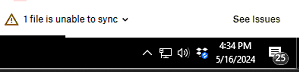
"1 file is unable to sync" error on sync status but "See Issues" option shows nothing.
Hi everyone, I could use some help on this
Dropbox pushed out an update to our user environment and it broke our integration and we are slowly starting to fix it. I have a user that has a file ...

Hannah Dropbox Community Moderator
1 year agoDropbox Community ModeratorThanks for bringing this to our attention, Tjador.
If you simply hover over the Dropbox icon in the system tray, do you see the name of the file and the specific reason why this file cannot sync?
Otherwise, if you open the Dropbox folder, is it possible to locate any file that would have the blue circling icon on it, indicating that it's trying to sync?
Let me know what you find.

Kare Lindahl
1 year agoNew member | Level 2
Hi,
I have the same issue and one of the 2 file names, but not why it is not syncing. To review all the files and folders for a file with a blue circle next to it is not practical, would take days or weeks. Is there another way of resolving this?
Thanks,
Kåre
- Megan1 year ago
Hey Kare Lindahl, thanks for posting here!
Do you simply see "2 files are unable to sync" whether you hover your mouse over the little Dropbox icon, and if you click on the same icon too?
If you could also clarify your app's version, and how long this has been happening for, I'd appreciate it.
Let me know more!

About Create, Upload, and Share
Find help to solve issues with creating, uploading, and sharing files and folders with Dropbox.
The Dropbox Community team is active from Monday to Friday. We try to respond to you as soon as we can, usually within 2 hours.
If you need more help you can view your support options (expected response time for an email or ticket is 24 hours), or contact us on X, Facebook or Instagram.
For more info on available support options for your Dropbox plan, see this article.
If you found the answer to your question in this Community thread, please 'like' the post to say thanks and to let us know it was useful!


