We're making some changes to the Dropbox Community 👩💻 - Find out more here.
Forum Discussion

gigaday
3 years agoHelpful | Level 6
automation stopped working two days ago
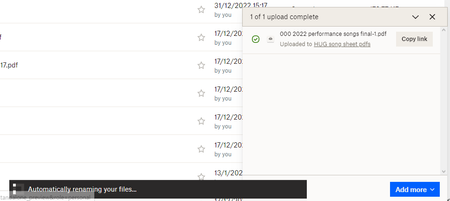
Automation used to work for me renaming my uploaded file, but now all I get is as shown below and the the spinner never stops. I am using Opera browser.
 3 years ago
I am happy to report that the problem I was having with Automation has now been resolved and seems to be working correctly, thank you - Tony
gigaday
3 years agoHelpful | Level 6
Walter - thanks for your help on this.
1. If I create a new folder and automate it, the renaming works - so not working might be something to do with the existing folder.
2. Or not ... I have just tried copying all the file (218) to my new test folder and the copy is stuck at "Automatically renaming your files..." and the copying has stopped there.
OK. I can now see that there is a problem copying SOME files but not all to my test folder. I can't see how I can send you an attachment or I would, as I now know that I have a file that won't automatically rename.
Tony

Jay Dropbox Community Moderator
3 years agoDropbox Community ModeratorDoes the filename have any special characters in it, or is different in any way, such as being a very large size or something else?
Could you type the filenames here for the files that do and don't work, if they don't have any personal info in them?
- gigaday3 years agoHelpful | Level 6
Thanks for getting back, Jay. There's nothing confidential in any of my Dropbox files.
The two that seem to have a problem are:
https://www.dropbox.com/home/HUG%20song%20sheet%20pdfs
All-I-Want-For-Christmas-Isyou 2022-12-17 (1).pdf and
All-I-Want-For-Christmas-Isyou 2022-12-17.pdf
I think they are both the same and I don't know why there are two of them, I don't remember copying them once they had been uploaded.
Regards.
Tony
- Jay3 years ago
Thanks for the info, I'm not seeing anything odd with those file names, aside from the fact that they're the same, and could both be affected by something.
Could the file be read-only, when you view the Properties (or Get Info) on the files in Explorer/Finder, prior to uploading?
Could you also attach a screenshot of your automation settings just in case?
- gigaday3 years agoHelpful | Level 6
Here is the screenshot - btw, I don't see any way that I can attach files in Dropbox - or make any changes to the Automation settings, just creat a new one or delete an existing. - Tony
About Create, Upload, and Share
Find help to solve issues with creating, uploading, and sharing files and folders with Dropbox.
The Dropbox Community team is active from Monday to Friday. We try to respond to you as soon as we can, usually within 2 hours.
If you need more help you can view your support options (expected response time for an email or ticket is 24 hours), or contact us on X, Facebook or Instagram.
For more info on available support options for your Dropbox plan, see this article.
If you found the answer to your question in this Community thread, please 'like' the post to say thanks and to let us know it was useful!


