Your workflow is unique 👨💻 - tell us how you use Dropbox here.
Forum Discussion

EspaceSud
1 year agoNew member | Level 2
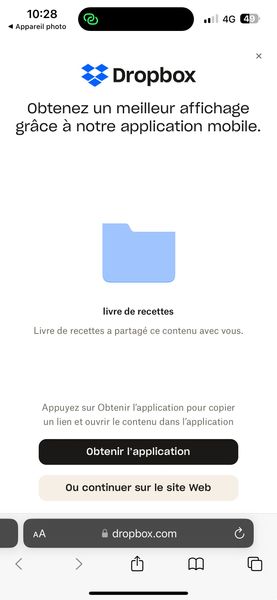
Can users completely skip the prompt to open the mobile app when we're sharing files with them?
We've shared a folder, but on mobile the visitors are all blocked by the landing page for the mobile application?
How can we avoid having this intermediate page that loses our visitors who are not...
- 1 year ago
Not sure how you are using it, but, I suppose the biggest thing I'd say is that Dropbox is not a content delivery system. It is not designed to be used for people to share it as a work group type set up - its much more intended for 'you need this doc/files etc. here you go' rather than a "we are selling these" or "here are your resources for X".
If you want to share lots of info with people (especially if it needs protecting and not sharing around) you need to look at a diff system unfortunately.

EspaceSud
1 year agoNew member | Level 2
I understand Dropbox's desire to push its mobile application to the fore, but it's at the expense of a clear interface. That's a shame. I just did a test on my users at the launch of our product, and 90% thought they had to have the mobile app to download, which is not true. The secondary button and closing cross are too discreet. As a result, we're losing downloads. It's a shame. We'll do things differently next time.

Mark Super User II
1 year agoSuper User IINot sure how you are using it, but, I suppose the biggest thing I'd say is that Dropbox is not a content delivery system. It is not designed to be used for people to share it as a work group type set up - its much more intended for 'you need this doc/files etc. here you go' rather than a "we are selling these" or "here are your resources for X".
If you want to share lots of info with people (especially if it needs protecting and not sharing around) you need to look at a diff system unfortunately.
- EspaceSud1 year agoNew member | Level 2
Okay, got it.
And finally the folder file downloaded on mobile is in .zip... not a folder with a pdf, definitely a problem.Thx
- Mark1 year ago
EspaceSud wrote:
Okay, got it.
And finally the folder file downloaded on mobile is in .zip... not a folder with a pdf, definitely a problem.Thx
And to add to what Rich said - that is same if you are on website or mobile. And across all Cloud solutions that I can think of - means you get 1 download instead of 10 or 15 for example.

About Create, Upload, and Share
Find help to solve issues with creating, uploading, and sharing files and folders with Dropbox.
The Dropbox Community team is active from Monday to Friday. We try to respond to you as soon as we can, usually within 2 hours.
If you need more help you can view your support options (expected response time for an email or ticket is 24 hours), or contact us on X, Facebook or Instagram.
For more info on available support options for your Dropbox plan, see this article.
If you found the answer to your question in this Community thread, please 'like' the post to say thanks and to let us know it was useful!


