We’re Still Here to Help (Even Over the Holidays!) - find out more here.
Forum Discussion

marsieee
5 months agoExplorer | Level 3
Can't upload large videos using the Dropbox iOS app
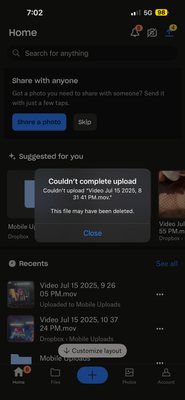
hello, i went to a concert yesterday and i used up a lot of storage. whenever im trying to upload the bigger videos (the longest video that worked was only 8 seconds long), i always get this error:
...

marsieee
5 months agoExplorer | Level 3
Hi! I tried at first the manual uploading but then the message from the screenshot would appear. Then I tried to share my content from my iPhone gallery and as soon as iPhone "prepared" the video, my phone would crash.

Hannah Dropbox Community Moderator
5 months agoDropbox Community ModeratorThanks for the update, marsieee.
Have you tried restarting the device at all, to see if it helps?
If it doesn't work through WiFi, can you also try uploading them while connected to your mobile data? Granted you're not on a limited plan of course.
And as an alternative, you could also try uploading them from our website.
About Create, upload, and share
Find help to solve issues with creating, uploading, and sharing files and folders in Dropbox. Get support and advice from the Dropbox Community.
The Dropbox Community team is active from Monday to Friday. We try to respond to you as soon as we can, usually within 2 hours.
If you need more help you can view your support options (expected response time for an email or ticket is 24 hours), or contact us on X, Facebook or Instagram.
For more info on available support options for your Dropbox plan, see this article.
If you found the answer to your question in this Community thread, please 'like' the post to say thanks and to let us know it was useful!


