We’re Still Here to Help (Even Over the Holidays!) - find out more here.
Forum Discussion

Nikita_
4 years agoNew member | Level 2
Deleting Drop Box from CloudStorage Location (M1 Beta)
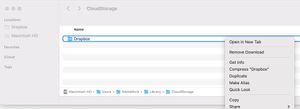
After upgrading to new Beta to dropbox for M1, syncing stopped working and finder window start freezing while searching dropbox files. So I decided to delete Dropbox, but cannot delete this Folder ...

Megan Dropbox Community Moderator
4 years agoDropbox Community ModeratorHi there, Nikita_! I hope you're doing well!
Out of curiosity, have you tried rebooting your device first?
One more thing is, if you press the [command] [delete] keyboard keys at the same time, what do you see?
Let me know more.
Out of curiosity, have you tried rebooting your device first?
One more thing is, if you press the [command] [delete] keyboard keys at the same time, what do you see?
Let me know more.
 Michael B.104 years agoExperienced | Level 13
You don't seem to know about this change:
 Tim T.133 years agoCollaborator | Level 9
This question is more complicated that it appeared at first. Just tried to delete the ~/Library/CloudStorage/Dropbox folder. Hitting CMD-DELETE or using the menu when trying to delete the folder itself results in a "bonk" for blocked operation.
I was able to delete the parent CloudStorage folder, since only Dropbox was inside anyway. However, I cannot empty the trash with "in use" warnings. Have deleted the Dropbox app itself, and rebooted the Mac, with no change in behavior. The trash still won't empty (although the app itself emptied out just fine.)
The Dropbox folder shows as zero bytes in the Trash folder, but really hoping I don't get stuck with these empty folders appearing in the trash forever. Must be some way to release the "in use" feeling of the files.
- Nancy3 years ago
Hey Tim T.13, I’m sorry to hear that.
If you check your Applications folder, has Dropbox been removed from there? I'd like to make sure that the uninstall has been completed successfully.
Also, can you please open the 'Activity Monitor' utility on your computer, as an extra step? Do you see any other processes associated with Dropbox there?

About Create, upload, and share
Find help to solve issues with creating, uploading, and sharing files and folders in Dropbox. Get support and advice from the Dropbox Community.
The Dropbox Community team is active from Monday to Friday. We try to respond to you as soon as we can, usually within 2 hours.
If you need more help you can view your support options (expected response time for an email or ticket is 24 hours), or contact us on X, Facebook or Instagram.
For more info on available support options for your Dropbox plan, see this article.
If you found the answer to your question in this Community thread, please 'like' the post to say thanks and to let us know it was useful!


