Your workflow is unique 👨💻 - tell us how you use Dropbox here.
Forum Discussion

bobv
5 years agoExplorer | Level 4
Dropbox and Parallels
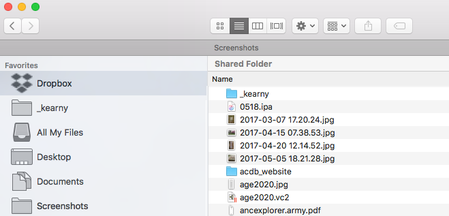
My Mac (iOS 10.12.6) is running Parallels (v15.1.4) so I have a Virtual Machine of Windows 10 Home.
I have Dropbox installed and it shows like this on my Mac: but it shows on the PC side...

Walter Dropbox Community Moderator
5 years agoDropbox Community ModeratorHey bobv; thanks for posting on our Community!
I don't see any syncing icons on your files on any of your screenshots. Could you take a look at the system tray (for Windows) and menu bar (for Macs) and let me know what the desktop app is reporting at the moment?
Thanks!

bobv
5 years agoExplorer | Level 4
Thanks for your response.
On the PC side, the system tray icon says "Dropbox 111.4.472" and "Up to date".
On the Mac side, the menu bar icon says "Dropbox 111.4.472", "uploading 100 files..." and "Downloading 5,192 files..." Several hours later these number have not changed. (!)
-Bob
- Daphne5 years ago
For the Mac side, can you try these steps to fix any incorrect file permissions that could be causing the stuck sync?
Also, before switching between the setups, I would recommend always checking that the desktop app is showing "up to date", to make sure everything is synced.
- bobv5 years agoExplorer | Level 4
Thanks for your response.
>> 5. While holding the Option/Alt key, click "Fix Permissions".
>> If the syncing is still stuck after allowing a short time for the changes to take affect,
>> please follow through the steps again and choose "Fix hardlinks"
I don't have "Fix Permissions" or "Fix hardlinks" options on that tab. The only buttons that I have are <Sign Out> and <Add team account>.
-Bob
- Walter5 years ago
Have you made sure that you're holding down the 'Option/Alt' key when on your account's tab in the app's preferences, Bob?

About Create, Upload, and Share
Find help to solve issues with creating, uploading, and sharing files and folders with Dropbox.
The Dropbox Community team is active from Monday to Friday. We try to respond to you as soon as we can, usually within 2 hours.
If you need more help you can view your support options (expected response time for an email or ticket is 24 hours), or contact us on X, Facebook or Instagram.
For more info on available support options for your Dropbox plan, see this article.
If you found the answer to your question in this Community thread, please 'like' the post to say thanks and to let us know it was useful!


