Your workflow is unique 👨💻 - tell us how you use Dropbox here.
Forum Discussion

Zespo
2 years agoNew member | Level 2
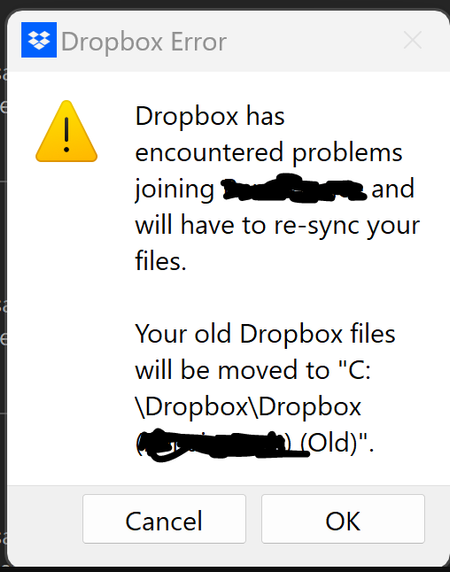
Dropbox app has to re-sync team folder
Hello all,
one of my users is experiencing this error "dropbox has encountered problems joining (team folder) and will have to re-sync your files". it then asks if they want to move it to (Team...

Hannah Dropbox Community Moderator
2 years agoDropbox Community ModeratorHey James Cain, thanks for your update.
If you check the "sync" tab in your Dropbox preferences, what is the actual syncing location of your Dropbox folder?
And if you check the original location, do you see a new Dropbox folder trying to sync there?
 James Cain2 years agoExplorer | Level 4
Hi Hannah.
The syncing location was changed after the last update to my "Users" folder on my C drive as the error states that Dropbox failed to sync the existing location. This did not have anywhere near enough space and went as expected.
When I relocated the sync location back to the existing Dropbox folder, Dropbox again showed an access error and said it will re-create the share in a new folder on the same drive. In the end I got sick of the looping craziness and deleted a large portion of the data on that drive so that Drobox could replicate the same data back to the same drive in a different folder. So now instead of "Dropbox (My Shares)" on my D drive, I have a folder called "My Shares Dropbox" and inside that a folder with my name and in that the folder structure that was previously inside "Dropbox (My Shares)". I also now have "My Shares Dropbox" and "My Shares Dropbox (Old)" which both seem to contain the same data although I am reluctant to delete anything lest that go equally as bad.
All in all this was a terrible experience and I would not recommend it to an enemy.
About Create, Upload, and Share
Find help to solve issues with creating, uploading, and sharing files and folders with Dropbox.
The Dropbox Community team is active from Monday to Friday. We try to respond to you as soon as we can, usually within 2 hours.
If you need more help you can view your support options (expected response time for an email or ticket is 24 hours), or contact us on X, Facebook or Instagram.
For more info on available support options for your Dropbox plan, see this article.
If you found the answer to your question in this Community thread, please 'like' the post to say thanks and to let us know it was useful!


