Your workflow is unique 👨💻 - tell us how you use Dropbox here.
Forum Discussion

Andika Scofield
2 years agoExplorer | Level 4
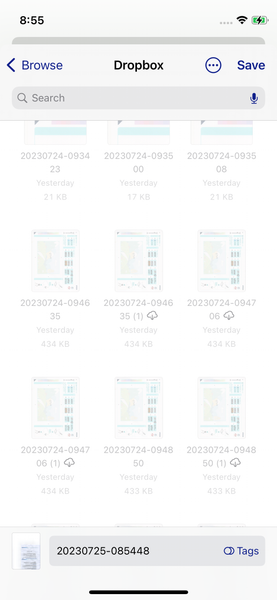
Dropbox duplicates a file when copy from iPhone Files app to Dropbox. Why?
Halo,
I'm Andi, iOS dev.
I found an issue when creating files to Dropbox, through "Files" in iPhone.
When I save my file to Dropbox from my app, sometimes that file will be duplicated.
...

Megan Dropbox Community Moderator
2 years agoDropbox Community ModeratorHi Andika Scofield, thanks for the screenshots!
Does this happen with a specific file type, or each and every file you choose to copy on your end?
Have you tried accessing your Files app, and choosing to disable Dropbox as a Location there, and then re-enable it? Also, have you updated to the latest OS 16.6?

Andika Scofield
2 years agoExplorer | Level 4
So far, I found in jpeg, pdf, and docx.
Not yet to check by re-enable Dropbox location. Currently I'm using iOS 16.5 and iOS 15.x.
Is there any effect from Dropbox setting? or maybe other condition from my iPhone?
- Megan2 years ago
Hi Andika Scofield, can you try to re-enable your Dropbox location, and then restart your device, just to check if the same behavior happens then?
- Andika Scofield2 years agoExplorer | Level 4
Megan thank you for your advice, this issue no longer occur.
- Andika Scofield2 years agoExplorer | Level 4
hallo Megan
Yesterday I found again this issue, even when I re-enable and restart my device. What should I do?
I have a related question about Dropbox showing up in the Files app, since when did Dropbox support the Files app on the iPhone?
About Create, Upload, and Share
Find help to solve issues with creating, uploading, and sharing files and folders with Dropbox.
The Dropbox Community team is active from Monday to Friday. We try to respond to you as soon as we can, usually within 2 hours.
If you need more help you can view your support options (expected response time for an email or ticket is 24 hours), or contact us on X, Facebook or Instagram.
For more info on available support options for your Dropbox plan, see this article.
If you found the answer to your question in this Community thread, please 'like' the post to say thanks and to let us know it was useful!


