Your workflow is unique 👨💻 - tell us how you use Dropbox here.
Forum Discussion

THX1965
2 years agoHelpful | Level 6
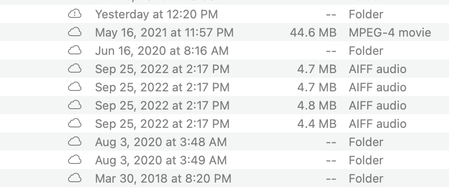
Dropbox Mac Beta: Green Circles are gone - everything has the cloud symbol
I am assuming work is being done in the background, but as of a few days ago, I no longer have green circles for downloaded (available offline) files. Everything has a cloud symbol (that symbol doesn...

Megan Dropbox Community Moderator
2 years agoDropbox Community ModeratorHi THX1965, can you also try out these steps?
If you edit a file, does the small circular syncing icon like that on the article appear, even if momentarily? If you right/control click a file and choose either "make available offline" or "make online-only", do you see any change?

Jeff6
2 years agoExplorer | Level 4
Easy way to solve it as customer support offered.
Just select all the folders from your root path of dropbox and right click to click "make available offline". Then the green circle check marks are back,
About Create, Upload, and Share
Find help to solve issues with creating, uploading, and sharing files and folders with Dropbox.
The Dropbox Community team is active from Monday to Friday. We try to respond to you as soon as we can, usually within 2 hours.
If you need more help you can view your support options (expected response time for an email or ticket is 24 hours), or contact us on X, Facebook or Instagram.
For more info on available support options for your Dropbox plan, see this article.
If you found the answer to your question in this Community thread, please 'like' the post to say thanks and to let us know it was useful!


