Your workflow is unique 👨💻 - tell us how you use Dropbox here.
Forum Discussion

daveandvera
2 years agoExplorer | Level 3
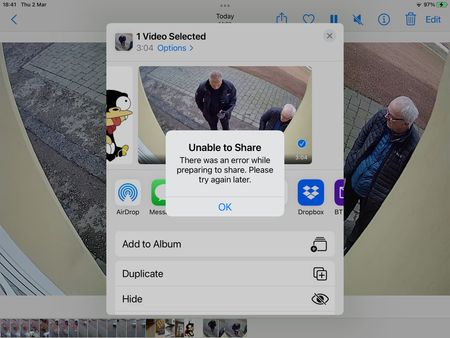
Error message when trying to upload a short video
hello, I am a novice user so please bear with me if I do something wrong here. I have a basic dropbox account, I use it for storing evidence for the police of crimes that regularly occur in my s...

daveandvera
2 years agoExplorer | Level 3
Hi again Walter, update important, I got it to work! This time I opened up the app for the CCTV system and uploaded from that directly to dropbox and it worked, however it still doesn’t work if I start with photos on the iPad and select upload to Dropbox and it doesn’t work from the dropbox app with a plus symbol so I really suspect it’s Apple software messing everything up again

Walter Dropbox Community Moderator
2 years agoDropbox Community ModeratorGlad to hear you got it to work! Have you checked for any pending OS updates on your device daveandvera?
- daveandvera2 years agoExplorer | Level 3
It just says the operating system is up to date, I find that whenever Apple forces you into an update something always has to be put back to my preferences. They always switch the Bluetooth on which I hate tick the box for GameCenter which I would never use all sorts of sneaky switch ons
Ever since Apple came out with the iPhone I have been a fan but these last few years ihave seen them for what they are money grabbing world dominating manipulative with a hidden agenda the iPhone I have at the minute it’s the last one I’ll ever be buying Apple is great when everything is playing nicely together but when you want to do something that they don’t want you to do or they decide it’s time they want you to buy another phone and brick your older phone you know somebody is pulling the strings to control people like sheep Rant over Lol
About Create, Upload, and Share
Find help to solve issues with creating, uploading, and sharing files and folders with Dropbox.
The Dropbox Community team is active from Monday to Friday. We try to respond to you as soon as we can, usually within 2 hours.
If you need more help you can view your support options (expected response time for an email or ticket is 24 hours), or contact us on X, Facebook or Instagram.
For more info on available support options for your Dropbox plan, see this article.
If you found the answer to your question in this Community thread, please 'like' the post to say thanks and to let us know it was useful!


