Our Community is in read-only mode until April 8th, learn more here. You can still search existing threads or get help via Dropbox Support, the Dropbox Help Center, or Learn.
Forum Discussion

Nfelsheim
3 years agoHelpful | Level 5
Error Messages: lost connection - Uploading Files
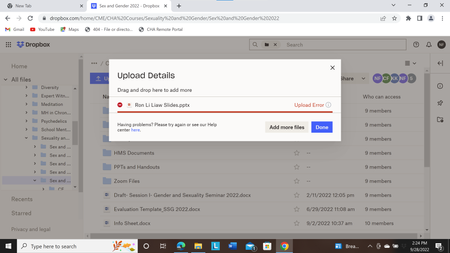
Hello, recently, I have been unable to upload small PPTX files that are well below the size limit to our web-based corporate (business) Dropbox account. The message is that it's a "lost connection"....
 3 years ago
Hannah, thanks for responding to my message!
I'm happy to say that I figured it out. It was an Xfinity/Motorola modem caused issue with my Internet connection. I now have a temporary solution in place. I can upload files on Dropbox.com now whether I use the Upload button or drag and drop.

Hannah Dropbox Community Moderator
3 years agoDropbox Community ModeratorHey Nfelsheim , thanks for bringing this to our attention.
Can you let me know if you're uploading the files through the 'upload' button or by drag and drop?
If it's by drag and drop, can you try the upload button, to see if you get a different behavior?
Also, are you and your colleague accessing Dropbox from the same network?
Keep me posted.
- Nfelsheim3 years agoHelpful | Level 5
Hannah, thanks for responding to my message!
I'm happy to say that I figured it out. It was an Xfinity/Motorola modem caused issue with my Internet connection. I now have a temporary solution in place. I can upload files on Dropbox.com now whether I use the Upload button or drag and drop.
- Walter3 years ago
Thanks for keeping us in the loop @Nfelsheim - I'm happy to hear it's sorted now.
See you around the Community and have a lovely week ahead!

About Create, Upload, and Share
Find help to solve issues with creating, uploading, and sharing files and folders with Dropbox.
The Dropbox Community team is active from Monday to Friday. We try to respond to you as soon as we can, usually within 2 hours.
If you need more help you can view your support options (expected response time for an email or ticket is 24 hours), or contact us on X, Facebook or Instagram.
For more info on available support options for your Dropbox plan, see this article.
If you found the answer to your question in this Community thread, please 'like' the post to say thanks and to let us know it was useful!


