Your workflow is unique 👨💻 - tell us how you use Dropbox here.
Forum Discussion

DebbiePinard
3 hours agoNew member | Level 2
Files not being shared across group members
Device PC, Mac Operating System/Browser (if using the web) Windows 11
We use the free version.
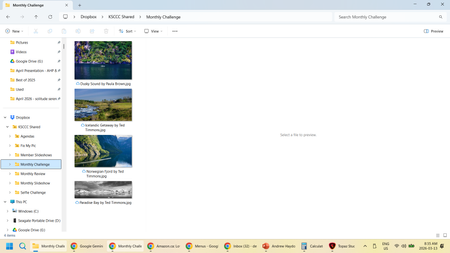
Question or Issue We use dropbox to share pictures for our camera club. Lately we have been...

Megan Dropbox Community Moderator
2 hours agoDropbox Community ModeratorHi there, DebbiePinard, let's jump right into this!
Please keep in mind that computers sync directly with the Dropbox website, not with each other. I'm mentioning this because in order to find where the problem lies, we need to start checking each computer you use to access Dropbox.
Based on the screenshots you provided, it seems that the member's device is still in the process of syncing. Can you start by comparing each device to the info you see on the web for the account? Each computer should sync the info to the web, and vice versa.
Also, can both you and your co-workers see your own changes online?
If you could attach a screenshot showing the folder or file as it appears in the file structure on the Dropbox site, that'd be amazing. Feel free to also have a look into this Help Center article.
Lastly, can you let me know more, in regards to the app's current version, and syncing status? You can find this by hovering your mouse over the little Dropbox icon in your taskbar, next to your WiFi.
Keep me posted, and we'll take it from there!
About Create, Upload, and Share
Find help to solve issues with creating, uploading, and sharing files and folders with Dropbox.
The Dropbox Community team is active from Monday to Friday. We try to respond to you as soon as we can, usually within 2 hours.
If you need more help you can view your support options (expected response time for an email or ticket is 24 hours), or contact us on X, Facebook or Instagram.
For more info on available support options for your Dropbox plan, see this article.
If you found the answer to your question in this Community thread, please 'like' the post to say thanks and to let us know it was useful!


