Need to see if your shared folder is taking up space on your dropbox 👨💻? Find out how to check here.
Forum Discussion

BobF1
4 years agoHelpful | Level 6
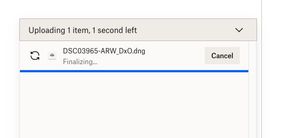
Finalizing taking forever
Trying to upload a dng file that is about 90MB in size to my gallery - fter taking the 3 minutes indicated it has been 15 minutes with the screen saying 1 second left and "finalizing"...what is going...
 4 years ago
Thank you, actually, I did switch from Firefox to Safari and that worked...
BobF1
2 years agoHelpful | Level 6
Yep - this thing just sucks. And I too hav no desire to get another browser for the convenience of the incompetants at Dropbox - I shall just never try it again (and tell my friends the same thing). I have been watching "19 seconds left" for tha past 5+ minutes in my attempt to upload 49 jpg images - enough already.

Megan Dropbox Community Moderator
2 years agoDropbox Community ModeratorHi BobF1, I hope you're doing well!
Let me clarify and add, that when we ask user after user to try a different browser, that's purely for troubleshooting purposes, not as a solution.
If this is a behavior that you notice on Chrome, but not when you go to Safari that means there's a specific setting/plug-in/cache that might be preventing this specific browser from working as it should, and we need to narrow down the root cause.
On our end, we need to identify that and see how we're going to proceed.
I hope this clarifies!
 adubble2 years agoNew member | Level 2
yes, this is ridiculous. it's not even "large" files. I'm doing it with normal .CR2 files and it just spins forever. I will be leaving Dropbox as soon as my term is up. Unreal how incompetent the response has been to this. It's literally the reason we use the cloud, to share files, and it can't do the job. Absolutely unreal. This needs to be SOLVED immediately.
About Create, upload, and share
Find help to solve issues with creating, uploading, and sharing files and folders in Dropbox. Get support and advice from the Dropbox Community.
The Dropbox Community team is active from Monday to Friday. We try to respond to you as soon as we can, usually within 2 hours.
If you need more help you can view your support options (expected response time for an email or ticket is 24 hours), or contact us on X, Facebook or Instagram.
For more info on available support options for your Dropbox plan, see this article.
If you found the answer to your question in this Community thread, please 'like' the post to say thanks and to let us know it was useful!


