Your workflow is unique 👨💻 - tell us how you use Dropbox here.
Forum Discussion

lukevan
3 years agoExplorer | Level 4
Folder commands missing from "background" right click when I click on empty space next to folder
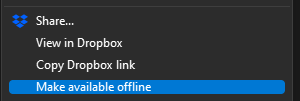
Hi there, previously, one was able to right click in empty space on a folder and have the same commands show up that show when right clicking on a folder:
These are the options that...

Jay Dropbox Community Moderator
1 year agoDropbox Community ModeratorHi Paltik, we appreciate the feedback on this matter. As this is related to how the OS itself processes right clicks, there isn't much we can suggest to resolve or workaround this behavior.

mgambrell
1 year agoCollaborator | Level 9
Lukevan is trying to click in the empty space BELOW the file items and implies that dropbox broke it, not that updating to windows 11 broke it.
Hannah then immediately asks what happens when you click the "blank space next to it". Next to what? Hannah thinks we're trying to interact with a folder as an item in the directory and missing by clicking too far to the right. Lukevan then sends a video proving he's clicking in the empty space below the items (there are no items, so he is clicking below zero items).
Rich then talks a lot and shows a video of clicking to the right of items, not below, showing he missed the point entirely. He explains that because the item has been missed, it shows the options that appears when right-clicking in the directory itself. It's not clear how Rich got those options to show up. Old dropbox I guess. I daresay today Rich wouldn't get them. These options not existing on Lukevan's system is what Lukevan is complaining about.
Paltik then mentions he understands the problem but misattributes it to a change in Windows 11.
Walter then misses the point completely and asks why Paltik can't click on "test folder's name". Paltik said "EMPTY SPACE", not "ON NAME".
Paltik then repeats EMPTY SPACE and draws an arrow pointing at EMPTY SPACE (and misattributes the problem to Windows 11 again)
Jay then mumbles something about "this is not our problem".
OK, let me straighten all this out. Windows 10, Windows 11, doesn't matter. Right click in an empty folder controlled by dropbox. Dropbox options should appear. They don't. A dropbox update broke this at some point (so says Lukevan, but I don't know if it ever worked on Win10). It's possible (likely, I'd guess) that Microsoft changed something which you need to accommodate with Win10 or at some point in an update thereafter.
Windows 7 - works. Dropbox 194.4.6267.
Windows 10 - doesn't work. Dropbox 194.4.6267.
Windows 11 - doesn't work. Dropbox 194.4.6267.
Dropbox is correctly registering itself in HCKR\Directory\Background\shellex\ContextMenuHandlers\DropboxExt like it's supposed to, but the extension must be internally declining it for some reason.
Note, by contrast, TortoiseGit works like I expect. The relevant code is starting here, to save you time, but dropbox could surely be fouling up at a number of other points:
About Create, Upload, and Share
Find help to solve issues with creating, uploading, and sharing files and folders with Dropbox.
The Dropbox Community team is active from Monday to Friday. We try to respond to you as soon as we can, usually within 2 hours.
If you need more help you can view your support options (expected response time for an email or ticket is 24 hours), or contact us on X, Facebook or Instagram.
For more info on available support options for your Dropbox plan, see this article.
If you found the answer to your question in this Community thread, please 'like' the post to say thanks and to let us know it was useful!


