Need to see if your shared folder is taking up space on your dropbox 👨💻? Find out how to check here.
Forum Discussion

Millenium
9 years agoHelpful | Level 5
How do I embed images with a direct link from Dropbox?
Hi,
I would like to share my pictures to forums where pictures are embedded like [img]http://imageurl.jpg[/img].
How to share pictures from Dropbox to the forums like that? I cant find a option where to get direct urls.
Hi,
It is super easy to get direct download link of image files that are saved in your Dropbox account. And more importantly they will work with [img] commands used in forums that you mentioned in your question.
Here is the step by step instructions:
1) Copy Dropbox link of the image file that you want to share. (Right click on image file in your Dropbox folder and choose Copy Dropbox Link). You should have something similar to this:
https://www.dropbox.com/s/tg0cfa565aue4ak/zoo.jpg?dl=0
2) Just delete dl=0 at the end of the link and replace it with raw=1
Now your link that you gonna use should look like this:
https://www.dropbox.com/s/tg0cfa565aue4ak/zoo.jpg?raw=1
Basically, what you are doing by adding the raw=1 to the end of the link is hotlinking it. That's is sharing direct download link to the file. Anyone who clicks on hotlinked file will not see any of the Dropbox frames, logos, etc. It works for any type of file that you share.
And when you use this modified link with [img] commands there should be no problems. I always use Dropbox images on other forums.
Hope it helps!

20 Replies
Replies have been turned off for this discussion
- Rich8 years ago
Super User II
wigwamtoys wrote:
... the links do not pull through and download from dropbox like they have done with other hotlinks i've made on our site.
All of your links appear to be working just fine, so this isn't a Dropbox issue. The problem is likely in how you're linking them or how your shreadsheet program is handling the links.
 wigwamtoys8 years agoNew member | Level 2
I see..strange. When I tested them they worked for me too; the raw image just opening as it should in my browser.
Thanks for the reply :cry: Wonder how i can solve my issue lol
 silvanet8 years agoNew member | Level 2
OK, that doesn't work for me at all. I'm not allowed to even see the link created. If I just copy the link from the address bar, it doesn't work. I don't get the "should look something like this" link you mention. I can't share a public folder with just anyone who has the link to the folder or files in it. I can only share with specific persons I email the hidden created link to. I sent it to myself and it doesn't let you see the link. All you can do is click to see the image. I then copied the link from the browser address bar. It looks nothing like your example. There is no ?dl=0 or anything at the end of it. The name of the image file is not even exposed. What am I missing?
- Rich8 years ago
silvanet wrote:
I'm not allowed to even see the link created.
Yes, you can. After the link is created you'll see two links in the Share settings for the file; Link Settings and Copy Link. Click on Copy Link and the proper link will be copied to your clipboard. Paste it where you need it and change ?dl=0 to ?raw=1.
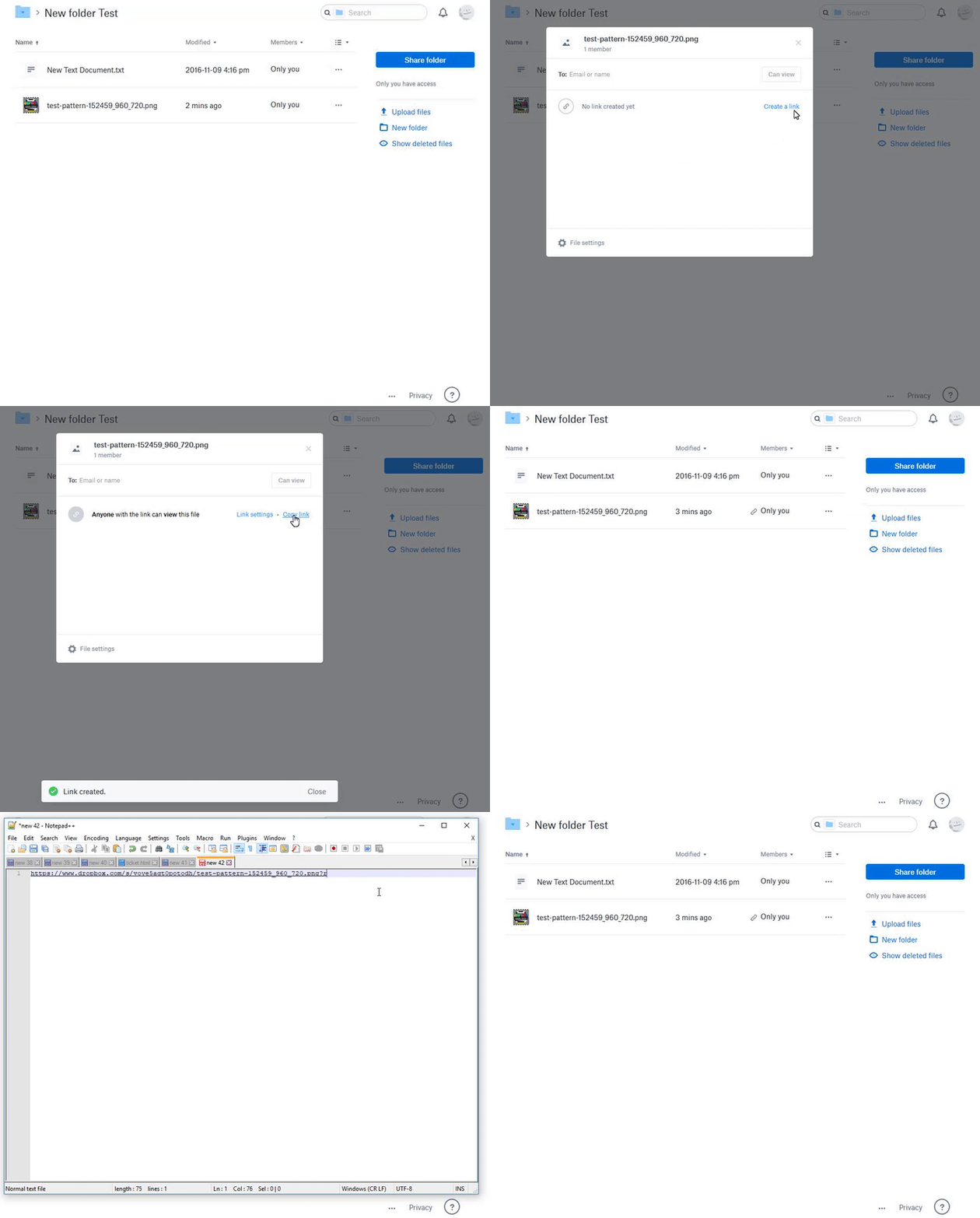
- silvanet8 years agoNew member | Level 2OK, I don't know how I missed that before. I never saw the "Anyone with the link can view this file" option. It just wasn't there. That's why I had to share it with myself, and it still didn't let me see it. Don't know why now it's appearing.
Anyway, still doesn't work for me. I'm trying to link a background image for FreeCodeCamp Challenge on CodePen. I can get it to work on GitHub. I can even create a folder to hold the image file instead of hosing it somewhere. CodePen just messes it up and shows a band of the image. Help on the FCC forum told me sites like Imgur and Google don't allow images to be used on webpages. People said Cloudinary was working, but it didn't work for me either. This may be a CodePen problem. Thanks for your kelp. - silvanet8 years agoNew member | Level 2By the way, that's really a cool recording of what you did. How did you do THAT?
- Rich8 years ago
silvanet wrote:
By the way, that's really a cool recording of what you did. How did you do THAT?I use Gyazo.
- silvanet8 years agoNew member | Level 2Went there but don't see at all how to do the little videos. It just appears to do screen captures. It looked like it was taking some time, so I clicked on something in the capture area and all I got was a black screen with a cursor moving.
- silvanet8 years agoNew member | Level 2Here's what I got. https://i.gyazo.com/bdf9631502e9699dd3dfdc41fb224b1c.mp4
 otelhan7 years agoNew member | Level 2
Hi,
Is there an option for uploading images, getting a temporary link that is displayeable on a website?
I noticed that the GetTemporaryUploadLinkResult provides a link that forces the browsers download the image instead of displaying them.
Is there a displayeable alternative that can be called through the API, instead of manually creating links for every image.
Thanks
[This thread is now closed by moderators due to inactivity. If you're experiencing a similar behavior, feel free to start a new discussion in the Dropbox Community here.]

About Create, upload, and share
Find help to solve issues with creating, uploading, and sharing files and folders in Dropbox. Get support and advice from the Dropbox Community.
The Dropbox Community team is active from Monday to Friday. We try to respond to you as soon as we can, usually within 2 hours.
If you need more help you can view your support options (expected response time for an email or ticket is 24 hours), or contact us on X, Facebook or Instagram.
For more info on available support options for your Dropbox plan, see this article.
If you found the answer to your question in this Community thread, please 'like' the post to say thanks and to let us know it was useful!


